This free invoice generator makes the invoice in your browser and hands you the PDF. There is no account to create, nothing is uploaded, and nothing you type is kept on this site. Type your details on the left and watch the document draw itself on the right, in one of eight layouts and any of eight languages, with your country’s VAT worked out for you. When it is right, download the PDF, print it, or email it to yourself and forward it to your client. If your client asks for an electronic invoice, the same document comes out as XRechnung, Factur-X or UBL, checked against the rules before the file is built.
Free Invoice Generator: No Sign-Up, No Upload, Nothing Stored
How to make an invoice in 3 steps
Step 1. Say who you are and who you are billing. The form on the left starts with your business: name, address, email, tax number, and a logo if you have one. Then the client. Then the lines: what you did, how many, at what price. Every keystroke redraws the invoice on the right, so you never wonder what a box is for. If you would rather see a finished one first, press Fill with an example and the page fills itself with a fictional business, three lines and a total. Change anything.
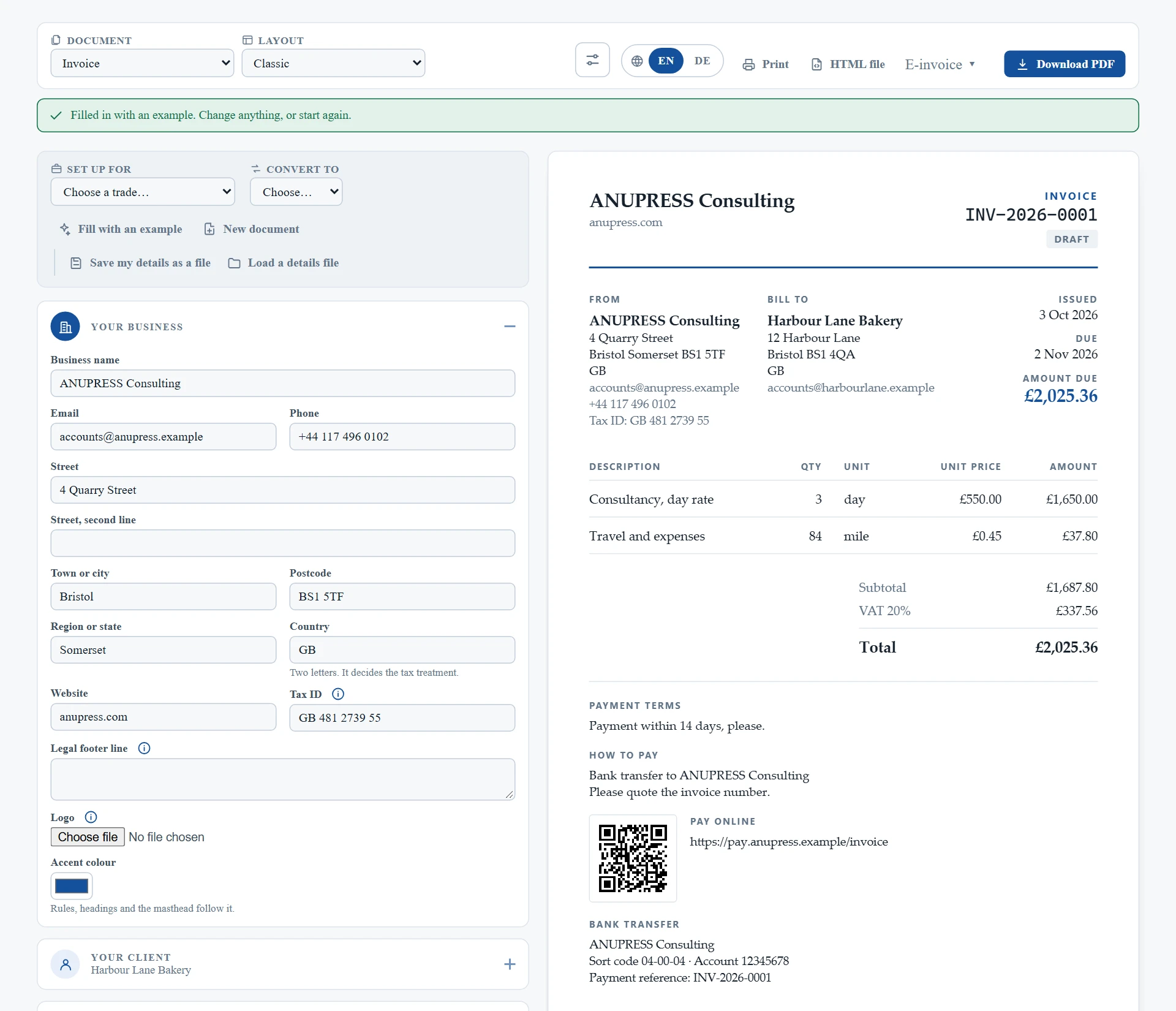
Step 2. Check the money. Tax in this invoice generator works one of three ways: a single rate you type in, which is what most small businesses want; a table of rates by country, for anyone selling across borders; or no tax at all, which is a real answer for a hobbyist or a charity. A discount, a delivery charge and any amount already paid each get their own box, and the balance still owed is what prints large. If you sell to a business in another EU country and both of you have a VAT number, the reverse charge is worked out and the sentence the law requires appears in the client’s language. You do not have to know that rule to get it right.
Step 3. Download, print or send. Download PDF gives you the file most clients expect, a few kilobytes for a plain document. Print prints the invoice and nothing else, with no browser header or footer in the margins. E-invoice builds the structured file a German public body or a Peppol network asks for. And Email it to me sends the file to your own inbox, ready to forward to your client. The next section explains how that works, because it is the one part that leaves your browser.
What this free invoice generator does that most hold back
The usual free invoice generators either watermark the PDF, stop after a few invoices, or ask you to sign up before the download. This one does none of that, and the reason is simple: your device does the work, so there is nothing for us to meter. What you get instead is the full engine from our Grist invoicing widget, with a one-page form in front of it.
- Eight document kinds: invoice, quote, proforma, receipt, credit note, statement, delivery note and packing slip. A delivery note shows no prices at all. A quote says plainly that it is not a request for payment.
- Eight layouts, from a classic letterhead to a coloured band to a till-roll receipt for a counter. Your accent colour and logo apply to all of them.
- Eight document languages. Choose German and the invoice says Rechnung, Fällig and Zwischensumme; the dates change form too. Your own wording is never translated, only the document’s.
- Fourteen trades as starting points. Pick Construction and the reference box becomes a job reference, the terms say materials stay yours until paid for, and the numbers run the way a builder’s do.
- Convert in one press. A quote becomes the invoice for the same work; an invoice becomes the credit note that reverses it, naming the invoice it corrects.
- Numbers that carry on. The first invoice is 0001; once it has been downloaded, printed or sent, the next one is 0002. The tool remembers what it has given out, in your browser, so two invoices never share a number.
- A payment code your client can scan. An IBAN on a euro invoice draws the GiroCode that European banking apps read; a UPI id does the same for rupees; a payment link serves any currency.
- Paper that fits the job: A4, US Letter, Legal, A5, and 80 mm or 58 mm till rolls that switch to a single narrow column.
One line stays on by default: at the very foot of the document, in the document’s language, a small note says it was made with this generator. It is how the tool stays free without limits. A checkbox removes it, and nothing changes when you do.
Emailing it to yourself, then forwarding it to your client
A browser cannot send email, so the email button has a server behind it. Ours is this site. It sends the file to you and to nobody else. You then forward that email to your client, or attach the file to a new email, from your own mailbox. This costs you one extra step. However, your client then gets the invoice from your own address, the one they already know.
Until October 2026 the tool sent the invoice straight to your client. That was quicker. On the other hand, it meant that anyone could send an invoice from our address under any business name, with any bank details on it. That is how invoice fraud works, so we changed it. Now the only person who gets an email from this site is the person who asked for the file.
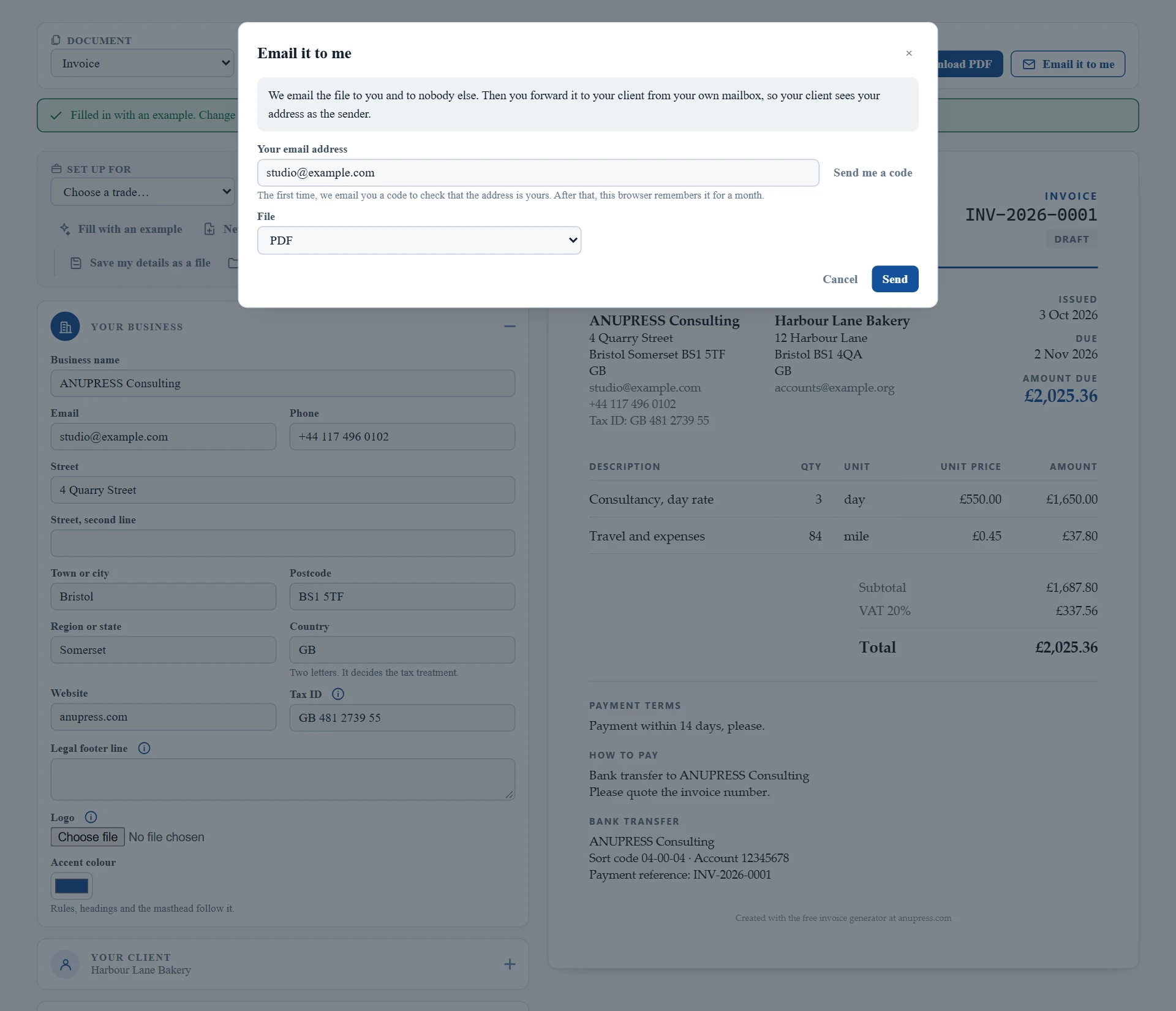
To stop anyone using an address that is not theirs, the first time you use it we email you a six-digit code and ask for it back. After that, this browser remembers your address for a month. The email itself is short and written by us. It names the file and explains how to forward it. The invoice is the attachment: the PDF or the e-invoice you chose.
There are limits as well. Each address, each connection and the whole site have a daily cap, and the example document cannot be emailed at all, because its addresses are made up. Nothing you send is written to disk here. The file is handed to the mail provider in the same moment and is gone.
Electronic invoices: XRechnung, Factur-X and UBL, checked first
Germany, France, Belgium, Poland and the Nordic countries are moving to invoices a receiving system reads without a person. From 2025 every German business must be able to receive one, and public bodies already refuse anything else. The file a receiver’s validator rejects comes back days later with a code nobody can read, so this invoice generator checks before it builds.
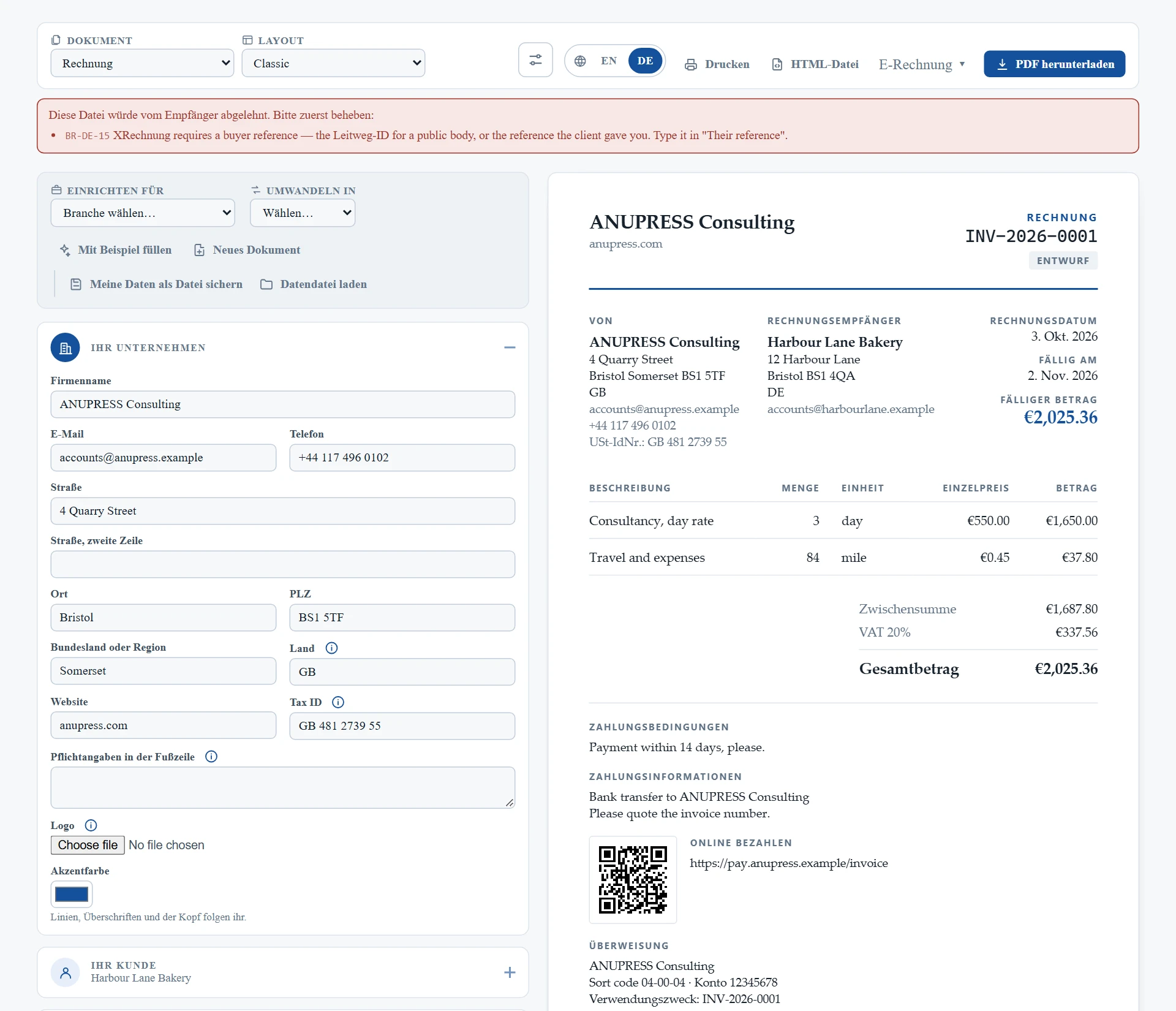
Choose a rulebook under The document: EN 16931, the European standard; XRechnung 3.0 for Germany; or Peppol BIS Billing 3.0 for Belgium, the Nordics and the Peppol network. The E-invoice button then offers three files. Factur-X, also called ZUGFeRD, is a PDF/A-3 with the invoice embedded as XML, one file a person and a machine can both read. UBL 2.1 and CII are the bare XML in the two syntaxes receivers use. Before any of them is built, the document is checked against the rules that catch most rejections: a country spelled out instead of a two-letter code, a VAT number with spaces in it, a missing buyer reference. Each finding names the rule and the box that fixes it.
The output has been run through the official tools. Twelve sample documents pass the EN 16931 validation artefacts and the KoSIT XRechnung 3.0.2 schematron with zero failed assertions in both UBL and CII; the KoSIT validator with the configuration German public bodies run accepts every XRechnung file; and Mustang confirms the Factur-X files as PDF/A-3b. Validate your first file with your own receiver’s checker all the same, as every sender does.
Tax, worked out the way your country does it
Most invoice generators give you one box called Tax and leave you to it. That is fine in one country and wrong in the next, so the rate table here is built the way a shop system’s is: rows matched on country, region, postcode and city, resolved by priority, with compound rates and a per-line tax class. You never see that machinery unless you want to. What you see is a choice.
| Setting | What happens | Who it is for |
|---|---|---|
| One rate I type in | Your rate, your name for it, applied to everything | Most sole traders and small businesses in one country |
| A table of rates by country | All 27 EU states under their local names, thirty more countries, India’s GST split by state, Canada with Quebec’s compound tax, the UK, Australia, the UAE, Singapore, South Africa | Anyone billing across borders |
| No tax at all | No tax line anywhere, which is different from a rate of zero | Hobbyists, charities, businesses below the threshold |
Three things happen by themselves. A sale to a VAT-registered client in another EU country charges no VAT and prints the reverse-charge sentence, citing Article 196, in the document’s language. A business trading under the small-business scheme can set that once and the document carries the sentence its country expects, such as the German § 19 UStG line. And prices that already include tax, the way a shop’s shelf price does, are handled so that £9.99 including 20 % VAT stays £9.99 and does not become £10.00 through rounding.
Two honest notes. Rates change, and the presets carry the date they were checked; they are a starting point and not tax advice. And two countries are left out on purpose: the United States, where sales tax varies by thousands of local districts and any small table would be wrong nearly everywhere, and Brazil. A plausible wrong table is worse than an empty one.
Where your data goes, which is nowhere
Everything in this free invoice generator runs in the browser tab you are looking at. The PDF is written by code in this page, the e-invoice XML is built here, the QR code is drawn here. No copy of your invoice, your client or your prices reaches this site. You can check that in under a minute: open your browser’s developer tools with F12, watch the Network tab, and download a PDF. No request carries your document, because no request is made.
Two things are kept, and only in your own browser. Your business details, so you do not retype them on every invoice; the document you are working on, until you close the tab; and the list of invoice numbers already given out, so the next one follows on. Forget my details removes all of it, and the wording says so honestly: there was never a copy anywhere else to delete. To carry your details to another computer, Save my details as a file writes one small file and Load a details file reads it back, numbering included.
The one exception is the send button, and it is described above: what you send is handed to a mail provider in the same request and not written down here. If you never press it, this site never sees a byte of your invoice.
What it will not do, on purpose
A tool that keeps nothing cannot keep a ledger, and it is better to say so than to pretend. This invoice generator makes one document at a time, well. It does not hold a list of your clients, it does not know which invoices are paid, and it cannot send a reminder next month, because next month it will not remember this one. Anyone who has outgrown that has outgrown a free generator, and the answer is the same engine with a database behind it: our invoice widget for Grist, which keeps clients, catalogue and every invoice in tables you own, sends reminders and statements, and is also free.
Three more limits, stated plainly. It does not collect payment; the QR code and the payment link take your client to your bank or your payment page, not through us. It does not transmit to the Peppol network; it builds the file, and an access point of your choosing sends it. And the PDF can draw every Latin, Greek and Cyrillic letter, with the accented characters of Polish, Czech and Hungarian included, but not Chinese, Japanese, Arabic or Devanagari script, which draw as a box.
On your phone
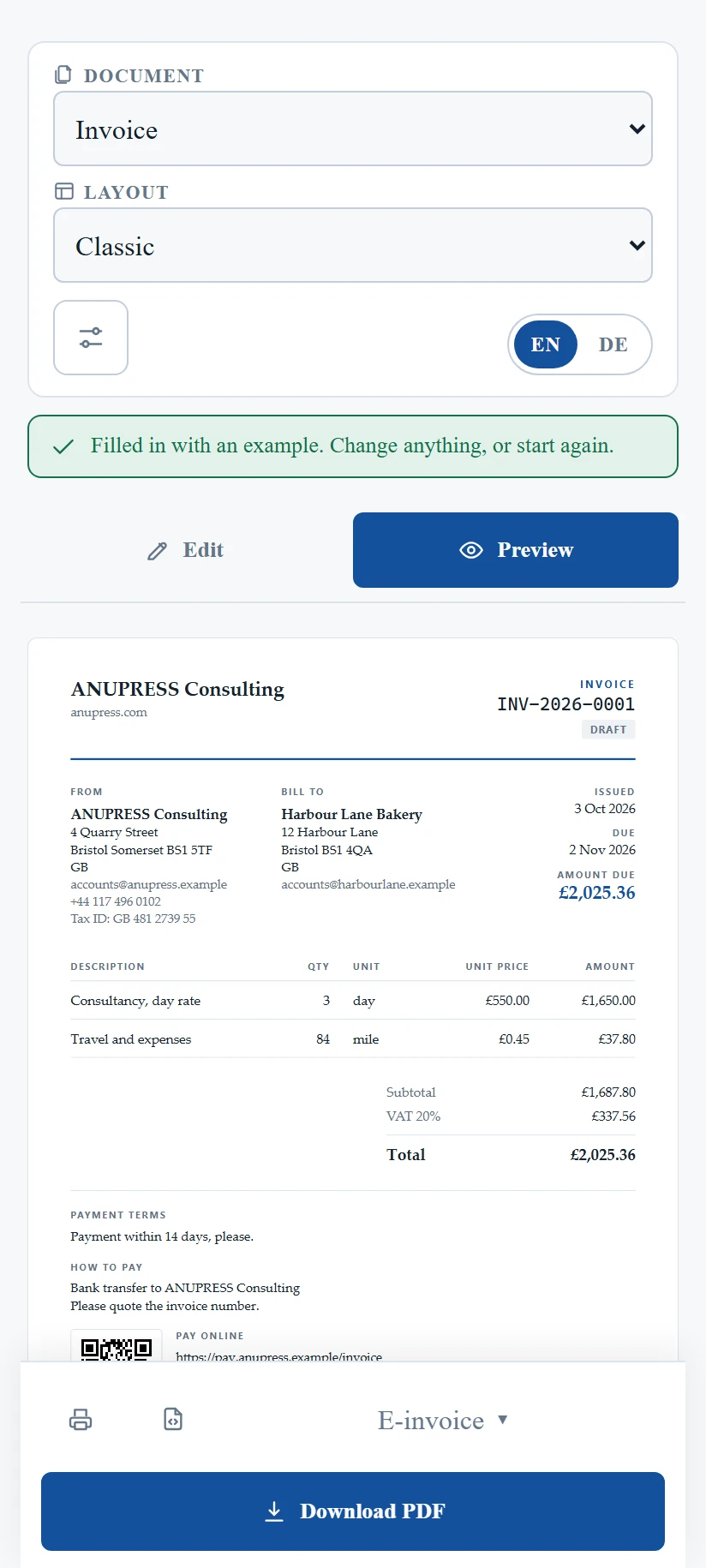
The same invoice generator, with two changes. The form and the document become two tabs, Edit and Preview, so each gets the whole screen. And the four actions, print, download, e-invoice and PDF, dock to the foot of the screen where a thumb can reach them however far you have scrolled.
Troubleshooting
The invoice shows a dash where my business name should be. The name box under Your business is empty. Everything on the document mirrors the form, so an empty box prints as a dash rather than as somebody else’s placeholder text.
The E-invoice button refuses to build the file. It is telling you what the receiver’s validator would have said, in words, before you sent it. Each line names the rule and the box to fill. The most common one on a German public-sector invoice is the Leitweg-ID, which the body gave you and which goes in Their reference.
The reverse charge did not apply. It needs three things: your country and your client’s country both as two-letter codes, both in the EU and different, and a VAT number on the client. Fill the client’s tax number and it applies.
My details disappeared. They live in this browser only. A private window, a different browser, cleared site data or Forget my details all start you fresh. Save a details file once and you can always load it back.
A letter prints as a box in the PDF. The PDF fonts cover Latin, Greek and Cyrillic scripts. Chinese, Japanese, Arabic and Indian scripts are outside them. The document on screen and the HTML file show every script; the PDF does not yet.
The email button is missing. The site switches emailing on, and there are days it is off. The PDF is always there. Download it and attach it to an email from your own mailbox.
Email it to me says it is still the example. The example uses made-up addresses, so it never leaves the page. Put in your own details, or start a new document, and try again.
Frequently asked questions
Is this invoice generator really free?
Yes, entirely. There is no limit on how many invoices you make, no watermark, no premium layout held back and no account. Your device does the work, so there is nothing for us to meter. The one thing we ask is a small line at the foot saying where the invoice was made, and a checkbox removes it.
Do I need to sign up?
No. There is no account and nothing to sign into. Your business details are kept in your own browser so you do not retype them, and a details file lets you carry them to another computer. If you want a tool that remembers your clients and which invoices are paid, that needs a database, and our free Grist widget is the same engine with one behind it.
Is my invoice uploaded anywhere?
No. The PDF, the e-invoice and the QR code are all built in the browser tab. You can watch the network tab while you download a PDF and see that no request is made. The only thing that ever leaves your browser is a file you choose to email to yourself, and that is handed to the mail provider without being stored here.
Can I make a German XRechnung with it?
Yes. Choose XRechnung 3.0 as the rulebook, fill in the Leitweg-ID the public body gave you, and the E-invoice button builds a UBL or CII file, or a Factur-X PDF with the XML inside. The document is checked against the XRechnung rules before the file is built, and the output has been accepted by the official KoSIT validator.
Can it send the invoice to my client?
Not directly. It emails the file to you, and you forward it to your client from your own mailbox, so your client sees your address as the sender. The first time, we email you a six-digit code to confirm the address is yours. After that, this browser remembers it for a month. On days the site has emailing switched off, download the PDF and attach it to an email yourself.
Which languages can the invoice be in?
English, German, French, Spanish, Italian, Dutch, Polish and Portuguese. The document’s own words change, such as Invoice, Due and Subtotal, and so does the date format. What you type yourself is never translated, so a German business writes its terms in German and they stay that way.
How does the tool know my VAT rate?
It does not guess. You either type one rate, which is what most businesses in one country want, or pick a country table that carries the standard and reduced rates under their local names. Presets are dated and are a starting point, not tax advice. The EU reverse charge and the small-business exemption sentence are applied by rule once the countries and tax numbers are filled in.
Can I make a quote or a receipt instead of an invoice?
Yes. The document chooser at the top offers invoices, quotes, proforma invoices, receipts, credit notes, statements, delivery notes and packing slips, and each behaves the way that document should. A quote converts into the invoice for the same work with one press, and an invoice converts into the credit note that reverses it.
More from the same toolbox
This invoice generator is one of the free tools on anupress.com/tools, all built to run on your own device. The PDF tools merge, split, compress and sign the files you make here without uploading them either. If you want the invoicing engine with a database behind it, the Grist invoice widget keeps clients, products and every invoice in tables you own, and it is free too. And if you would rather have that set up for you, there is a setup service.