We build Grist tools, so read this one sceptically
That is the first thing you should know about a comparison of Grist with its two main rivals written by people who sell Grist services. It is stated here rather than in a footer. What follows gives Airtable and NocoDB the cases they genuinely win, and has a section on where Grist loses.
Three products solve roughly the same problem: a spreadsheet that behaves like a database. They differ far more in licence and in price than in what you can build with them. This guide compares Grist, Airtable and NocoDB on the things that are checkable, says where each one genuinely wins, and declares the commercial interest we have in your answer.
Our conflict of interest, before anything else
ANUPRESS builds two free widgets for Grist and sells a paid Grist setup service. If you choose Grist, we may make money. If you choose Airtable or NocoDB, we make nothing. That is a real incentive and you should price it into everything below.
Three things we did to keep this useful in spite of that. Every price and limit was read on the vendor’s own page on 10 September 2026 and is quoted rather than paraphrased. There is a section on where Grist loses, and it is not a token one. And we recommend the other two outright for the cases they win, which you can check by reading where Airtable wins before anything else.
A comparison that never recommends a competitor is an advert. If this one had reached the conclusion that our own product is best at everything, it would not have been worth publishing.
The short version
If you read one thing, read this. The recommendation changes with what you are optimising for, and for half of the cases below the answer is not Grist.
| If your priority is | Pick | Why |
|---|---|---|
| Other people have to use it | Airtable | The largest ecosystem, the most templates, and the most people who already know it without training |
| An interface over a database you already run | NocoDB | It connects to a live PostgreSQL or MySQL and works on the real tables, which neither of the others does this way |
| Free, self-hosted, no limits | NocoDB or Grist | Both Community editions are free and bounded only by your server; Grist’s licence is the more permissive of the two |
| Genuinely open-source licensing | Grist | grist-core is Apache-2.0 with no field-of-use restriction. The full edition is not open source, so run the grist-oss image |
| Programmable formula cells | Grist | Formulas are Python. All three can script; Grist is the one that puts it in the cell rather than a separate layer |
| The most generous hosted free tier, on records and history | Grist | 5,000 records per document, against 1,000 per base for Airtable and 1,000 per workspace for NocoDB. Airtable Free allows far more people |
The licence question, which most comparisons get wrong
This is the largest real difference between the three, and it is routinely reported incorrectly, including by people with no axe to grind.
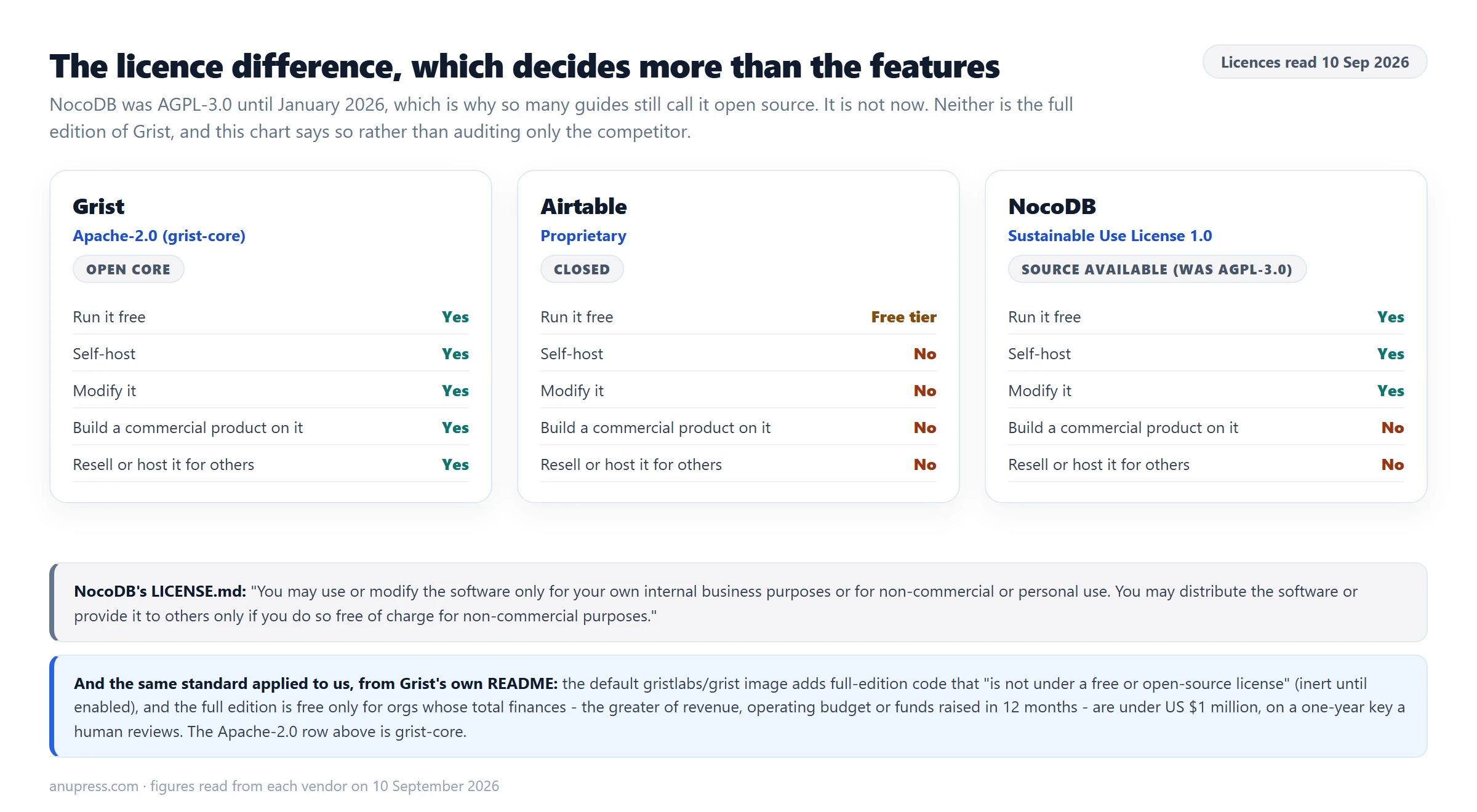
Grist’s core is Apache-2.0. That is an ordinary open-source licence. You may run it, modify it, build a business on it and redistribute it, commercially, without asking.
Airtable is proprietary, which is not a criticism, only a fact. You use it on their terms and on their servers. They publish no self-hosted edition.
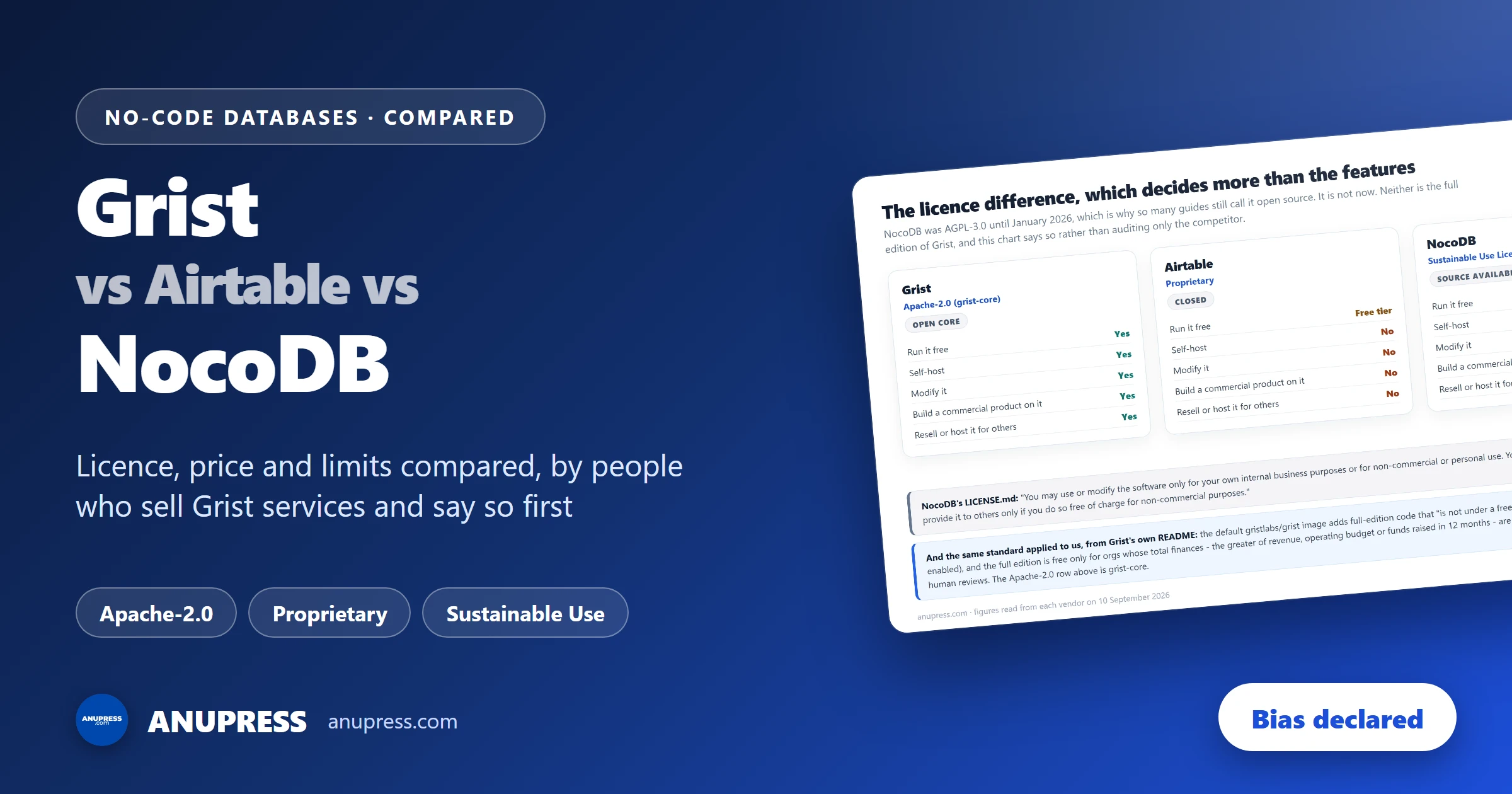
NocoDB is not open source today, and it is described that way almost everywhere for a good reason: it used to be. NocoDB was licensed AGPL-3.0, ordinary OSI-approved open source, until January 2026. Guides written before then were right when they were published, and calling them careless would be unfair. It now ships under the Sustainable Use License, version 1.0, dated 29 January 2026 and published in its own repository. NocoDB has not tried to hide the change: it now describes the project as fair-code rather than open source. The relevant sentence is short:
Read what that does and does not stop. Running NocoDB inside your own company, free, on your own server, is expressly permitted. For the large majority of readers this changes nothing at all, and NocoDB remains an excellent free choice.
It bites in narrower cases: building a commercial product on top of it, offering it to clients as a hosted service, or redistributing a modified version for money. If that is your plan, the licence is the first thing to read, not the last.
And the same standard, applied to us
It would be easy to stop there, having audited the competitor and not the product we sell. So: Grist is open-core too, and you should know where its line sits.
The Apache-2.0 guarantee attaches to grist-core, which is the Community edition.
Grist Labs sells a full edition with features that are not in it, and the default
gristlabs/grist Docker image ships that extra code alongside the open-source part.
Grist’s own README is direct about what it is: “This extra code is not under a free or
open-source license”. It also says the code is “by default completely inert and
inactive” until switched on from the Admin Panel, and that a pure open-source image,
gristlabs/grist-oss, is available and functionally equivalent by default.
There is a size condition as well, and it is stricter than Grist’s own summary of it makes it sound. The README says the full edition is free “for individuals and small orgs with less than US $1 million in total annual funding”, but the eligibility page it links to defines the test as your total finances: the greater of gross annual revenue, total annual operating budget, or funds raised in the preceding twelve months. So a bootstrapped business turning over 1.5 million qualifies on “funding” and fails on the real test. The key lasts a year, you apply for it, and a human reviews the application. That is a restriction based on who you are, a different shape from NocoDB’s restriction on what you may do, but a restriction all the same, and quoting our own side’s friendlier wording while quoting the competitor’s binding licence text would have been the easy way out.
gristlabs/grist-oss rather than the default image, and expect single
sign-on, automations and email notifications to sit in the full edition rather than the
open-source one.What they actually cost
Every figure below was read on the vendor’s own pricing page on 10 September 2026. Prices move, so check before you commit, and treat any comparison table without a date on it as fiction. The three pages are Grist, Airtable and NocoDB: go and check us.
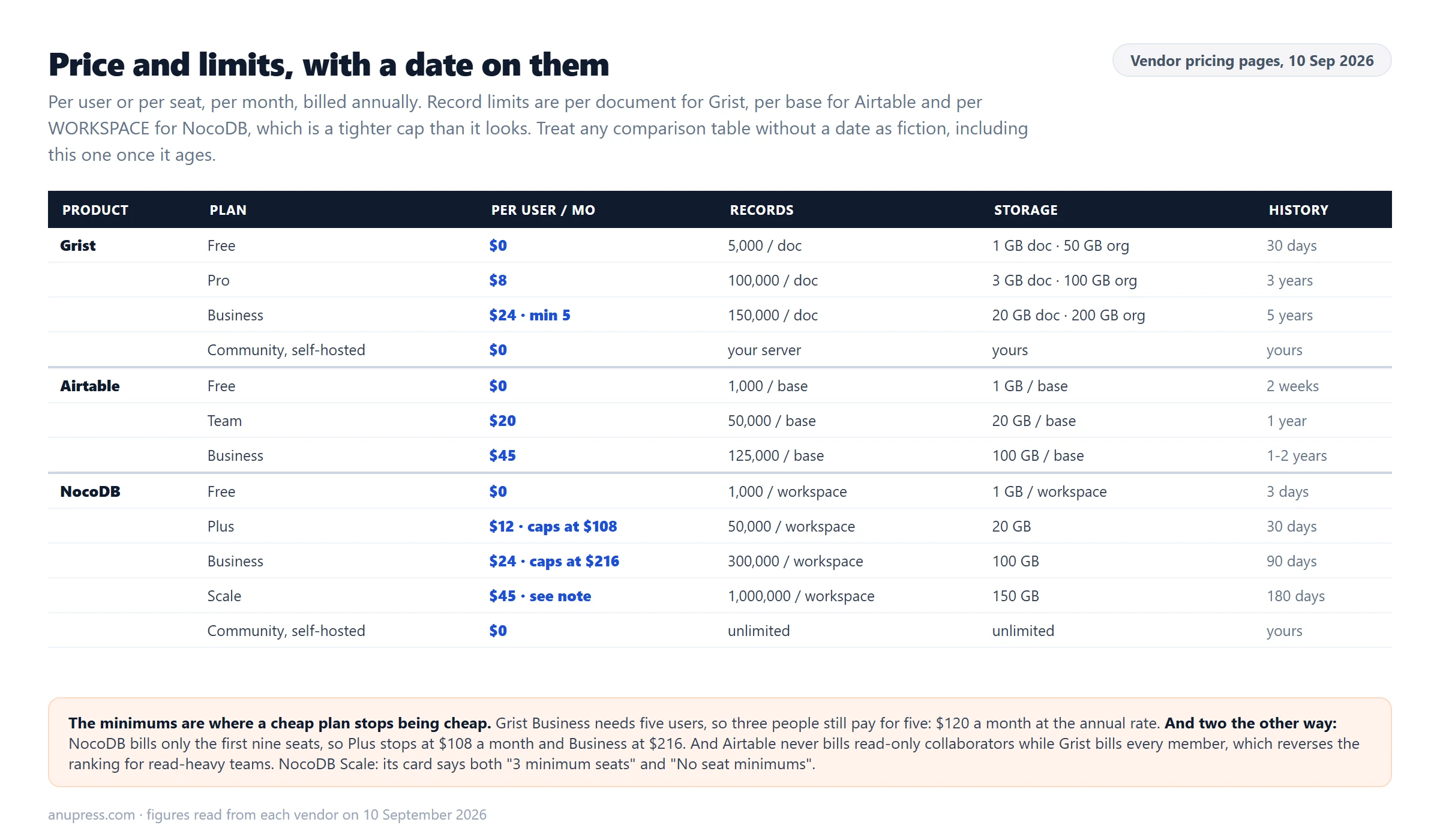
| Plan | Price | Records | Storage | History |
|---|---|---|---|---|
| Grist Free | $0 | 5,000 per document | 1 GB per doc, 50 GB org | 30 days |
| Grist Pro | $10/user/mo, $8 annual | 100,000 per document | 3 GB per doc, 100 GB org | 3 years |
| Grist Business | $30/user/mo, $24 annual, min 5 users | 150,000 per document | 20 GB per doc, 200 GB org | 5 years |
| Grist Community, self-hosted | $0 | Your server’s limits | Yours | Yours |
| Airtable Free | $0 | 1,000 per base | 1 GB per base | 2 weeks |
| Airtable Team | $20/user/mo annual | 50,000 per base | 20 GB per base | 1 year |
| Airtable Business | $45/user/mo annual | 125,000 per base | 100 GB per base | 1 to 2 years, see note |
| NocoDB Free | $0 | 1,000 per workspace | 1 GB per workspace | 3 days |
| NocoDB Plus | $12/seat/mo annual, capped at $108 | 50,000 per workspace | 20 GB | 30 days |
| NocoDB Business | $24/seat/mo annual, capped at $216 | 300,000 per workspace | 100 GB | 90 days |
| NocoDB Scale | $45/seat/mo annual, 3 minimum seats per its feature list, though the same card also says “No seat minimums” | 1,000,000 per workspace | 150 GB | 180 days |
| NocoDB Community, self-hosted | $0 | Unlimited, and unlimited seats | Unlimited | Yours |
The free tiers, which is where most people actually start
Two comparisons are worth separating here, because they are usually run together.
Among hosted free plans the comparison needs care, because the three cap different things. Grist allows 5,000 records per document. Airtable allows 1,000 records per base. NocoDB allows 1,000 records per workspace, counted across all of its bases, so it is a tighter cap than the other two rather than the equivalent one it looks like. All three allow as many documents or bases as you want, which means the per-container multiplication that helps Grist and Airtable does not help NocoDB at all. History differs as well: Grist keeps thirty days, Airtable two weeks, NocoDB three days. Seats need care too, because the three count different people. Grist Free allows ten members of any role, plus two guests per document. Airtable Free allows five editors or creators on top of fifty commenters and unlimited read-only collaborators. NocoDB Free allows three editors plus ten commenters. So “ten against five against three” inverts the moment you count actual people: on named humans Airtable Free is much the most generous and Grist Free the most rigid.
Grist is the most generous of the three hosted free tiers on both records and history. We would rather you took that from the numbers above than from us asserting it.
Among all free options, the two self-hosted editions beat everything hosted, and they beat it together. NocoDB Community is free with unlimited records, storage and seats. Grist Community is also free and bounded only by your server. On price, records and seats the two are level, and on licence terms Grist Community is the more permissive of the pair. The price of either is that you run and back up a server. If you are comfortable with a container and a nightly backup, nothing hosted competes with that.
Where Airtable wins
Airtable is the most closed of the three, and the most expensive to start with, though at the top self-serve tier its Business plan ties NocoDB Scale at 45 dollars and carries no seat minimum. There are still cases where it is plainly the right answer.
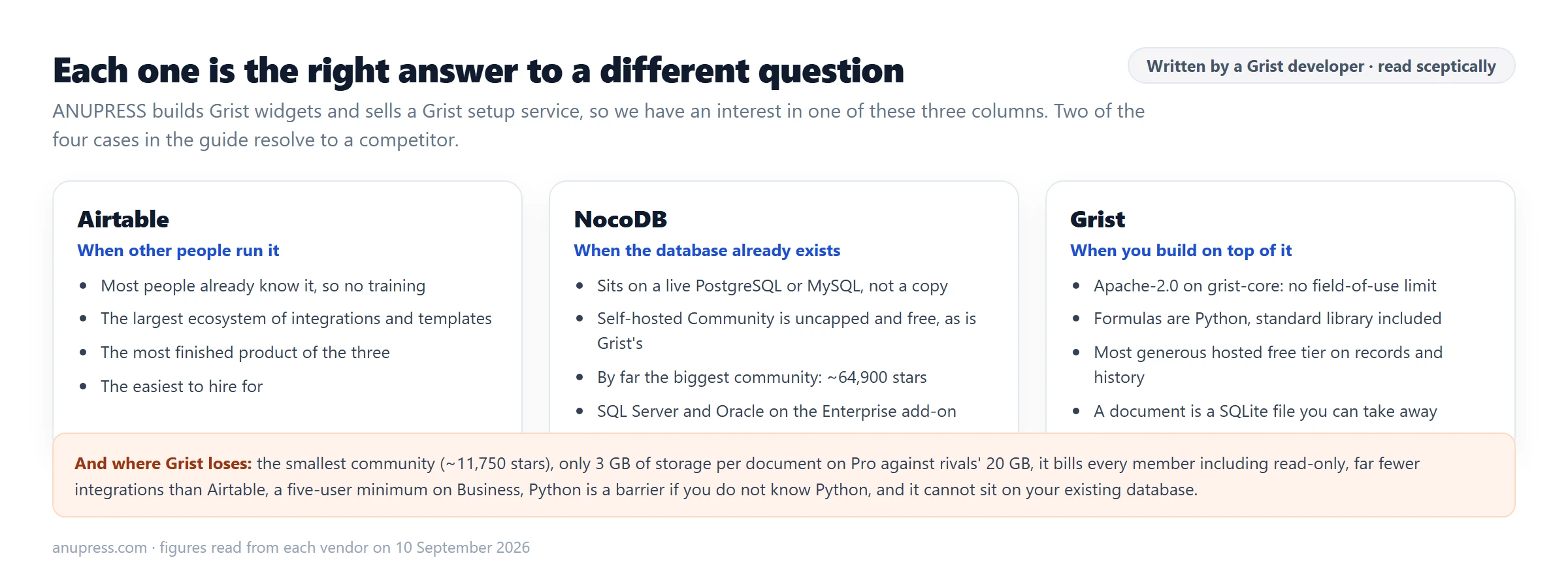
- Other people already know it. Hand a base to a marketing team and somebody in the room has used Airtable. Neither rival is close on that, and training time is a real cost that never appears in a pricing table.
- The ecosystem. Templates, integrations, an extension marketplace and a large pool of freelancers who build in it for a living. If your requirement is “it must talk to the eleven other tools we use”, Airtable is the safe answer.
- Polish. It is the most finished product of the three, and it is not particularly close on that either.
- The app layer. Interface Designer lets you put a usable front end in front of a base for people who should never see the table. All three overlap heavily on core spreadsheet-database work, and this is one of the places Airtable goes furthest beyond it.
If you are choosing on ideology rather than on who has to use the thing on Monday, you are choosing badly. Airtable’s price buys a more finished product, the largest ecosystem of the three, an app layer the others do not match, and people who already know it. Those are worth money, and it would be convenient for us to summarise them as merely “familiarity”.
Where NocoDB wins
NocoDB does one thing neither of the others does in the same way, and for the right reader it settles the question on its own.
- It sits on the database you already have. NocoDB connects to a live PostgreSQL or MySQL instance and reads and writes the real tables, rather than importing a copy you then have to keep in sync. SQL Server and Oracle are available as an Enterprise add-on. Note the tiering: usable external connections start at Business on the cloud plans, and are unlimited on the free self-hosted Community edition, which is the route we would take. If you have a production database and want a usable interface over it without a migration, this is the product.
- The self-hosted free tier is unlimited. No record cap, no seat cap, no storage cap. Grist Community is equally unbounded, so this is a tie rather than a NocoDB-only win.
- The largest open-source community of the three by a wide margin. On the day we checked, its main repository carried about 64,900 stars against roughly 11,750 for Grist’s core. More stars is not better software, but it does mean more tutorials, more answered questions and more people who have already hit your problem.
Where Grist wins
Having given the other two their due, here is the case for the one we have an interest in.
- The licence is ordinary open source. Apache-2.0 on the core, with no field-of-use restriction. You can build a commercial product on Grist without reading a licence twice. Among these three that is unique.
- Formulas are Python, in the cell itself. Grist’s documentation states that formulas are written in Python and that the entirety of Python’s standard library is available. What is unusual is the placement: the programmability is in the formula field, not in a separate scripting layer bolted beside it. Two qualifications, because this is the claim we most benefit from you believing. The bundled packages are what you get, so hosted Grist will not let you add pandas or requests. And all three products have automation and scripting facilities beyond formula fields, which this guide did not test and which may close much of this gap for your work.
- The most generous hosted free tier, at five times the records of either rival and unlimited documents.
- Documents are portable. A Grist document is a SQLite file you can download and open elsewhere, which is a meaningful hedge against any vendor, including this one.
Where Grist loses
The section that makes the rest of this worth reading. These are the reasons not to take our advice.
- It is the smallest community by a long way. Roughly 11,750 stars against NocoDB’s 64,900 on the day we checked. Fewer tutorials, fewer Stack Overflow answers, fewer people to hire, and a longer wait when you are stuck at eleven at night.
- Far fewer integrations than Airtable. If your workflow depends on a long chain of third-party connectors, expect to build some of them yourself.
- The five-user minimum on Business is a genuine cliff. A three-person team that needs a Business feature pays for five seats. That is 120 dollars a month at the annual rate for three people, which is worse than Airtable Team or NocoDB Business at that size, though still under Airtable Business at 135. Note the other direction too: NocoDB Business stops at 216 dollars a month however large the team gets, and Grist has no such ceiling.
- Python is a barrier if you do not know Python. We list it as a strength above and it is one, but a first-time user who wants a formula to join two fields will find Airtable kinder.
- Attachment storage is its weakest number, by a lot. Grist Pro gives 3 GB per document at 8 dollars, against 20 GB for NocoDB Plus at 12 and 20 GB per base for Airtable Team at 20. At an identical 24 dollars, Grist Business gives 20 GB per document against NocoDB Business at 100 GB. There is an organisation ceiling too, 50, 100 and 200 GB by plan, which caps the unlimited-documents multiplication this guide leans on elsewhere.
- It bills every member. Read-only users cost a full seat on Grist and nothing on Airtable.
- It cannot sit on your existing database the way NocoDB does.
Which should you pick?
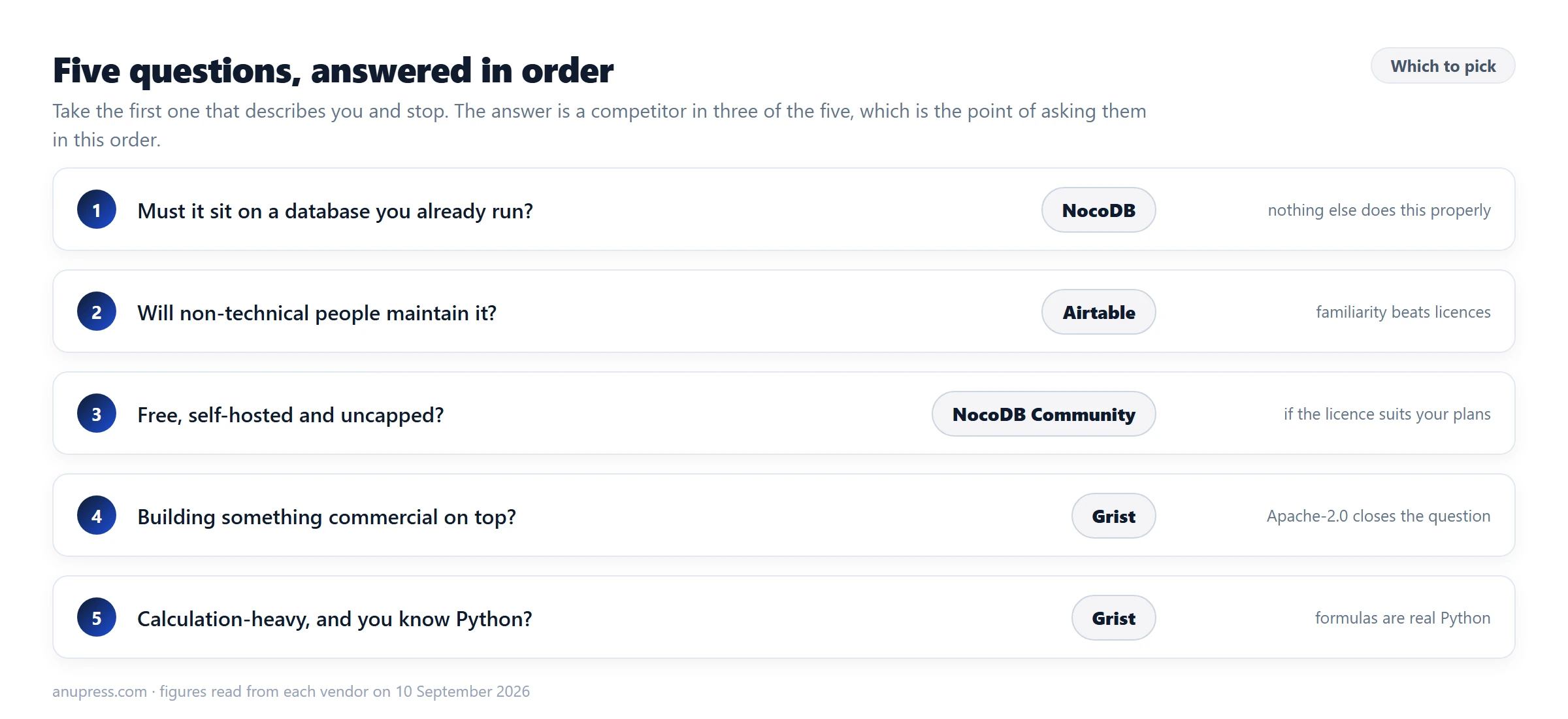
- Does it have to sit on a database you already run? NocoDB. Nothing else here does that job properly.
- Will people other than you maintain it? Airtable, unless they are technical. Familiarity beats licences when somebody else is on support duty.
- Do you want it free, self-hosted and uncapped? Either Community edition. NocoDB if you want the larger community, Grist if you want the more permissive licence.
- Will you redistribute, embed or host the software for others? Grist, and run
the
grist-ossimage. Apache-2.0 is the only licence of the three that leaves that question closed. - Is the work calculation-heavy, and do you know Python? Grist.
Where this guide stops
Naming the limits is more useful than pretending there are none, and on this topic we have more than usual.
We are not neutral, and no amount of care fixes that. Use this as one input, check the prices yourself, and weight our conclusions accordingly.
We did not benchmark all three at scale. We use Grist daily and know it far better than the other two. Nothing here is a performance comparison, because we did not run one, and a confident claim about which is faster with 200,000 rows would be invented.
Three tools is a narrow field, and the choice of three deserves explaining. We left out Baserow, Teable, Notion, Coda, Smartsheet and monday.com, among others. The reason is scope rather than merit: these three are the ones most often shortlisted against each other, and a comparison that covers eight products at this depth covers none of them properly. Baserow and Teable in particular belong in any serious open-source shortlist, and their absence here is a gap rather than a verdict. If you want the wider field, Grist publishes its own roundup of Airtable alternatives, and you should read that with the same suspicion you are reading this one.
Prices decay. Every figure is dated 10 September 2026 and read from the vendor. If you are reading this much later, treat the numbers as a starting point.
Some things are deliberately absent. We do not claim Airtable “cannot” be self-hosted, only that it publishes no self-hosted edition, which is what we can check. We left out per-plan automation limits for Airtable, which the pricing bullets do not state per period.
One correction we owe you. An earlier draft of this guide said we had omitted NocoDB’s unlimited-seat price because we could not pin down its unit. That was wrong: the figure is on their pricing card, and it is now in the table above. We were checking our own claim less carefully than we checked theirs, which is the exact failure this section exists to catch.
Grist, Airtable and NocoDB FAQ
Is NocoDB open source?
Not today, though it was until January 2026, which is why so many guides still say it is. NocoDB was AGPL-3.0 for most of its history and now ships under the Sustainable Use License, which permits use only for your own internal business purposes or for non-commercial or personal use, and permits redistribution only free of charge and for non-commercial purposes. That is source-available rather than open source, and NocoDB itself now says fair-code rather than open source. For most readers it changes nothing, because running it inside your own business is expressly allowed. It matters if you want to build a product on it or resell it. In fairness we should add that Grist is open-core too: its Apache-2.0 guarantee covers grist-core, not the full edition.
Which of the three has the most generous free plan?
The two self-hosted Community editions, and they tie: NocoDB Community is free with unlimited records, storage and seats, and Grist Community is free and bounded only by your server. Both cost you running and backing up a server. Among the hosted free tiers, Grist allows 5,000 records per document and unlimited documents, while Airtable allows 1,000 records per base and NocoDB allows 1,000 records per workspace across all of its bases. Airtable also keeps only two weeks of history on its free plan against Grist’s thirty days.
Can Grist connect to an existing PostgreSQL database?
Not in the way NocoDB does. This is NocoDB’s strongest feature and it is worth being clear about: NocoDB connects to a live PostgreSQL or MySQL database and reads and writes the real tables, rather than importing a copy. If you already have a production database and you want a friendly interface over it, that is the specific job NocoDB does best of the three.
Why are Grist formulas different?
They are Python, and they sit in the formula cell itself rather than in a separate scripting layer. Grist’s documentation states that formulas are written in Python and that the entirety of Python’s standard library is available. Two honest limits: the bundled packages are what you get, so hosted Grist will not let you add packages such as pandas, and all three products offer automation and scripting beyond formula fields, which this guide did not test. If you already know Python this is a genuine advantage; if you do not, it is a steeper start than Airtable.
Which is cheapest for a small team?
Self-hosting NocoDB’s Community edition costs nothing but your server. Among hosted plans read on 10 September 2026, Grist Pro is 10 dollars per user per month, or 8 billed annually. NocoDB Plus is 12 dollars per seat per month billed annually. Airtable Team is 20 dollars per user per month billed annually. Watch the minimums: Grist Business requires five users and NocoDB Scale requires three.
Should I trust a Grist comparison written by a Grist developer?
Treat it with suspicion, which is why we say so plainly rather than in a footer. We build two free Grist widgets and sell a paid Grist setup service, so we benefit when you choose Grist. Read the section on where Grist loses, check the prices against the vendors yourself, and note that we recommend Airtable and NocoDB over Grist for specific cases in this guide. If a comparison never recommends a competitor, that tells you something.
When is Airtable still the right answer?
When other people have to use it, and when you need it to talk to everything else. Airtable has by far the largest ecosystem of integrations, templates and consultants, and the most people who already know it without training. If you are handing a base to a marketing team next week, or hiring someone to maintain it, that familiarity is worth more than a licence argument.
Do any of them keep my data in the EU?
The reliable answer for all three is to self-host, which puts the data wherever you put the server. Grist Community Edition and NocoDB Community are both free to self-host, though NocoDB’s licence restricts what you may then do commercially with the software itself. Hosted-region guarantees change often enough that you should check the current terms with the vendor rather than trust a guide, including this one.
Bottom line
These three are closer in capability than in licence and price, so decide on those. If somebody else has to run it, Airtable. If it must sit on a database you already have, or you want something free and uncapped on your own server, NocoDB. If you are building something commercial on top, or the work is calculation-heavy and you know Python, Grist.
The one claim in this guide worth carrying away regardless of what you choose is the licence one. NocoDB is widely called open source and is not, and the sentence that decides it is one line long. That does not make it a worse product. It makes it a product whose terms you should read before you build a business on it, which is true of Airtable too, and less true of Grist.
We sell Grist services, and we have just spent two sections telling you when not to buy them. If Grist is your answer, our invoice widget and charts widget are free and open source, and the setup service is there if you want the work done for you. If it is not your answer, the free invoice generator needs no database at all.
Written by the ANUPRESS team, who build Grist widgets and sell a Grist setup service. Every price and limit was read on the vendor’s own pricing page on 10 September 2026, and the licence wording was taken from the projects’ own licence files. Prices change and licences are revised. Found something out of date, or think we have been unfair to Airtable or NocoDB? Tell us and we will check it.