










This review contains affiliate links. If you buy through them, ANUPRESS may earn a commission at no extra cost to you. How this works.
Hostinger sells one thing at two very different prices: a headline rate as low as $2.99 a month, and the bill you pay from year two onward. This review treats them as the separate decisions they are.
Last updated: July 2026. All prices and features checked directly on hostinger.com in July 2026.
In this review
The short verdict
Hostinger is a genuinely strong budget host with one catch that’s easy to miss if you only look at the homepage. The Premium and Business plans undercut most of the market on introductory price while including a free domain, unlimited SSL, an AI agent for WordPress management, and enough storage and websites for the vast majority of small sites. hPanel is one of the cleaner control panels in the industry, support is available 24/7 through live chat, and third-party monitoring in 2026 consistently shows uptime at or above the advertised 99.9%.
The catch is the same one every long-term-promo host has: the price on the homepage is a 48-month rate, and renewal costs three to four times more. That’s not hidden, it’s printed on the same pricing page, but it changes the math if you’re comparing hosts on their first-year sticker price alone rather than what you’ll pay across the site’s life.
If you’re comfortable paying upfront for a multi-year term and you don’t need phone support, Hostinger is easy to recommend, especially for a first website, a blog, or a small business site where budget matters more than a dedicated account manager. Developers and small agencies also get more than the “beginner host” label suggests: SSH, WP-CLI, and Git access ship on every plan rather than being reserved for the top tier. If you want a host that costs more but does more hand-holding by default and includes geo-distributed backups from the cheapest plan up, our SiteGround review covers the stronger managed option.
Plans and pricing, checked July 2026
Hostinger’s shared and cloud lineup has shifted since last year’s numbers, and it helps to know what changed before you compare this review against an older one. Websites-per-plan and storage allowances are lower on Premium than they used to be, Business now supports Web Apps and a bundled AI agent, and the overall structure leans harder into the 48-month term as the “real” price. These are the published prices as of July 2026, all billed as a 48-month upfront term (shorter terms are available at a higher monthly rate; exact figures vary by region, currency, and ongoing promotions, so treat this as the shape of the pricing rather than a fixed quote).
| Plan | First term | Renewal | Websites | Storage |
|---|---|---|---|---|
| Premium | $2.99/mo | $10.99/mo | 3 | 20 GB SSD |
| Business | $3.99/mo | $16.99/mo | 50 | 50 GB NVMe |
| Cloud Startup | $7.99/mo | $25.99/mo | 100 | 100 GB NVMe |
Every plan includes a free domain for the first year, unlimited free SSL, weekly automatic backups at minimum, a 1-click WordPress installer, unmetered bandwidth, and 24/7 live chat support. That baseline undercuts what several competing budget hosts charge extra for, and “everything’s included” claims are easy to make and rarely itemized, so here’s the actual list:
- Unlimited SSL certificates on every domain you host
- A free domain for the first year on annual-or-longer plans
- Automatic backups, weekly at minimum
- Unmetered bandwidth, with no visible traffic cap in normal use
- Access to professionally designed templates and the drag-and-drop website builder
- Email addresses at your own domain, free for the first year
- 24/7 multilingual live chat support
- A 30-day money-back guarantee
What the paid upgrades buy you beyond that baseline: Business jumps from SSD to NVMe storage, moves from weekly to daily-plus-on-demand backups, adds five Web Apps, a free CDN, WordPress Multisite, and the Kodee AI agent for managing WordPress by chat. Cloud Startup doubles storage again, adds ten Web Apps, a dedicated IP address, priority 24/7 support, 100 PHP workers, 2 million inodes, and 4 GB of dedicated RAM for handling traffic spikes without a manual upgrade.
Notice what changed from prior years: Premium now caps out at three websites rather than the much higher figure it used to advertise. If you’re planning to run more than a handful of small sites on one account, Business is the realistic starting tier, not Premium, and budgeting for that upfront avoids an unplanned upgrade six months in.
The renewal jump is the real price
Here’s the sentence most quick-take reviews bury: Premium renews at $10.99 a month after starting at $2.99, a 3.7x increase. Business goes from $3.99 to $16.99, a 4.3x jump. Cloud Startup moves from $7.99 to $25.99, roughly 3.3x. None of this is concealed, it’s on the same pricing page you bought from, but a first-term price that low anchors expectations in a way the renewal invoice does not honor.
Here’s what that does to a three-year total, paid year by year at list price:
| Plan | Year 1 (promo) | Years 2 + 3 (renewal) | 3-year total | Real monthly average |
|---|---|---|---|---|
| Premium | $35.88 | $263.76 | $299.64 | $8.32/mo |
| Business | $47.88 | $407.76 | $455.64 | $12.66/mo |
| Cloud Startup | $95.88 | $623.76 | $719.64 | $19.99/mo |
So the real three-year price of “$2.99 hosting” is closer to $8.32 a month. That’s still competitive for what Premium includes, and cheaper than most of the “budget” alternatives once you run their renewal numbers too, but it’s a different figure than the one on the homepage, and it’s the one you should compare against other hosts.
Two things follow from that. First, always evaluate a host at its renewal price, since that’s what you pay for most of the years you’ll use it. Second, Hostinger typically only discounts the 48-month term this aggressively, so paying for the longest available term upfront is the single biggest lever you have over lifetime cost. If a shorter commitment fits your situation better, run the math on that term’s monthly rate before assuming the headline price applies to you, then set a renewal reminder regardless of which term you pick. A calendar note costs nothing and saves you from an unpleasant surprise on your card statement two or four years from now.
Performance: what independent tests actually show
Hostinger runs its shared and cloud plans on LiteSpeed web servers with its own caching layer, NVMe storage on Business and up, and a free CDN starting on Business. On the WordPress side, Object Cache and LiteSpeed’s WordPress-specific optimizations handle server-level caching without plugin configuration, similar in spirit to how SiteGround bundles its own Speed Optimizer, though the underlying stack differs.
Rather than run our own single-snapshot benchmark, which tends to say more about that particular hour than about the host, it’s more useful to look at what sustained third-party monitoring found across 2026. TechRadar’s ten-week monitoring window recorded 100% uptime and a largest contentful paint of roughly 0.6 seconds. HostAdvice’s Uptime Robot checks, run continuously across thousands of samples, and HostingStep’s long-running dataset (more than 564,000 tests tracked since 2021) both placed Hostinger among the faster mainstream hosts, with HostingStep ranking the Business plan 5th out of 34 WordPress hosting providers tested in its 2026 comparison, an 8-out-of-10 score in a genuinely competitive field. Independent time-to-first-byte figures reported across several 2026 reviews cluster in the 150-250ms range, which is solidly in the “fast” tier for shared and entry cloud hosting. At least one of those benchmarks measured Business handling simulated load roughly 8x faster than Premium, which tracks, since Business is the tier that includes the free CDN.
Take any single number, including the ones above, as directional rather than gospel. Server performance on any host varies by plan tier, datacenter load, time of day, and what else you install on the site once it’s live. What you can verify for your own build is to run a fresh install through Google’s PageSpeed Insights right after setup, then again after adding your real content and plugins. That comparison tells you what your specific site actually does, which matters more than what a lab measured on someone else’s clean install.

Data centers: where Hostinger’s servers actually are
Hostinger operates data centers in twelve locations across four continents: five in Europe (France, Germany, Lithuania, the Netherlands, and the UK), three in Asia (India, Indonesia, and Malaysia), three in the US (Phoenix, Boston, and Asheville), and one in Brazil. Its CDN extends coverage further, with edge locations including Johannesburg, Japan, and Sydney handling cached content for visitors outside those primary regions. Which locations are offered to you depends on the plan, with Web and Cloud plans getting the widest choice, and the final list is whatever hPanel shows at setup, since availability changes without much advance notice.
The location you choose at signup matters for every request that isn’t served from cache. A reader base in the UK gets penalized by round-trip latency if their site sits on a US server, even with a CDN handling static assets like images and stylesheets. The rule holds regardless of host: pick the datacenter nearest your actual audience, not nearest to you, and lean on the CDN to smooth over the rest for a genuinely global readership.

The WordPress side: what “managed” means here
Hostinger’s plans function as managed WordPress hosting sold at shared-hosting prices, and the “managed” label is worth taking literally rather than as marketing shorthand, because the pieces are concrete and checkable rather than vague:
- Automatic updates and a vulnerabilities scanner. WordPress core and plugin updates run on a schedule you can configure, and a dedicated scanner flags known vulnerabilities in installed plugins and themes before they become an actual incident rather than after.
- Free migration. An automatic migration tool moves an existing site in without you touching the database directly, and Hostinger’s team can also complete the move for you if you’d rather not handle the technical steps yourself.
- WordPress acceleration. LiteSpeed and Object Cache work together to cache database queries and rendered page output at the server level, which is normally the harder-to-configure part of WordPress performance on a generic host.
- Staging on Business and up. Clone a live site into an isolated copy, test a plugin update, theme change, or PHP version bump somewhere that can’t break what visitors currently see, then push the change to live once it checks out.
- WordPress Multisite (Business and up). Manage several related WordPress installs from a single dashboard, useful for agencies managing client sites or anyone running a small family of related blogs or microsites.
- WooCommerce support. Business and Cloud plans include tools for setting up and running a store, from bulk product management to sales reporting inside hPanel.
If you’re planning a WooCommerce build specifically, Business is the sensible starting point: staging lets you test checkout and theme changes without touching the live store, and the included daily backups give you a real rollback path if an update breaks something mid-launch. Our step-by-step WordPress WooCommerce tutorial walks through setup to first sale, and most of it assumes a host that already handles SSL, caching, and backups for you, which is the baseline Hostinger provides across its plans.
Developer tools and advanced features
Hostinger doesn’t gate its more technical tools behind the most expensive plan the way some competitors do. That’s easy to miss when a host markets itself primarily to beginners, so it’s worth saying plainly:
- WP-CLI and SSH access, included on every plan. WP-CLI lets you manage a WordPress install from the command line, and SSH gives direct server access for anyone comfortable working outside a control panel.
- Git integration. Deploy code changes from a Git repository instead of manually uploading files over FTP.
- Multiple PHP versions. Switch the PHP version per site to match an application’s requirements or test compatibility ahead of an update that needs a newer release.
- DNS management. Full control over DNS records for pointing traffic, setting up email authentication, or connecting third-party services, all handled inside hPanel.
- A dedicated cache manager. Clear server-level cache manually when you need fresh content to show immediately.
- 100+ one-click application installs. Beyond WordPress, Hostinger supports one-click deployment for a wide range of open-source applications.
Together, this means Hostinger scales reasonably well past the “first website” use case. Web Apps, the feature added to Business and Cloud Startup, is Hostinger’s application-hosting layer for running non-WordPress projects, Node.js apps, Python scripts, and similar, on the same account as your main site, without needing a separate VPS.

Meet Kodee, Hostinger’s AI agent
New for 2026 is Kodee, an AI agent bundled into hPanel and, on Business and Cloud plans, into WordPress management specifically. In hPanel generally, Kodee handles setup tasks like connecting domains, configuring DNS, and walking through common fixes, and it’s the first point of contact in live chat before handing off to a human agent. Inside WordPress, the AI Agent version can publish posts, manage WooCommerce listings, and make site changes from a plain-language chat request.
Our honest read: treat it as a genuinely useful add-on rather than the reason to buy. Host-bundled AI assistants are new enough industry-wide that their long-term reliability for anything beyond routine tasks is still being tested by real usage at scale. None of Hostinger’s core value, price, storage, uptime, backups, depends on Kodee working perfectly. If you’d rather manage WordPress by hand, nothing about the plan requires you to touch it.

hPanel: the part you touch every week
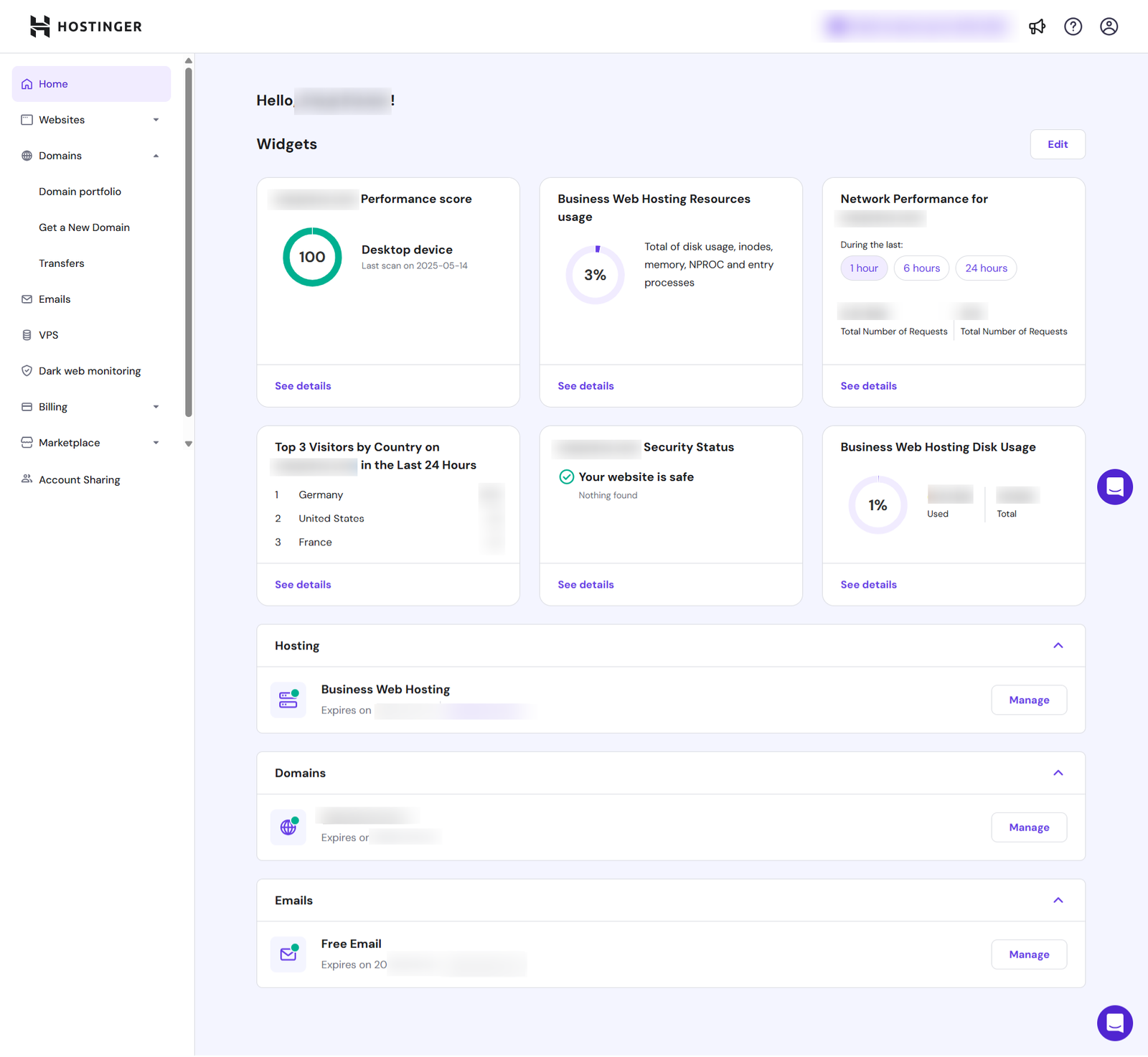
Hostinger builds and maintains its own control panel, hPanel, rather than licensing cPanel like a large share of the hosting industry, and it’s a genuine strength of the platform rather than a cosmetic rebrand. Common tasks, installing WordPress, creating an email account, restoring a backup, checking resource usage, sit a click or two from the main dashboard instead of buried in a grid of unlabeled icons the way legacy cPanel installs often are. The layout groups things the way a site owner thinks about their site (Websites, Domains, Emails, Security) rather than the way a server administrator’s manual would organize them.
That matters most for people who are new to hosting entirely. If you’ve ever handed a generic cPanel login to someone non-technical and then fielded their confused questions for a week afterward, the difference is the point: hPanel’s plain-language labels and grouped sections mean fewer support tickets and less hand-holding for routine changes.
The same organization extends to the tools you reach for less often but need to find fast under pressure: PHP version switching, SSH and SFTP credentials for a developer you just brought on, or DNS records when pointing a domain mid-migration. Every plan gets access to these, including WP-CLI and Git integration, which is more generous than hosts that lock developer tools behind their most expensive tier.

Security and backups
The included security stack is broad for the price point: unlimited free SSL certificates issued automatically on every domain, a malware scanner that runs proactive checks, domain WHOIS privacy protection so your personal registration details aren’t sitting in a public database, and IP and country-level blocking bundled with the free CDN on Business and up. DDoS mitigation is included as standard across the lineup.
As with any host, this only covers half the picture. A hosting plan alone doesn’t make a site invulnerable, and pretending otherwise would be dishonest. Server-side protection doesn’t fix a weak WordPress admin password, an outdated plugin nobody updated in a year, or a login page left exposed at the default URL, those are yours to manage inside WordPress itself. If you want a practical checklist for locking down the WordPress side specifically, our guide on how to secure a WordPress website from hackers in 2026 pairs directly with what Hostinger already handles at the server level.
Backup frequency scales with plan: Premium gets automatic weekly backups, while Business and Cloud Startup step up to daily automatic backups plus on-demand backups you can trigger yourself right before a risky change. Restores are handled through hPanel rather than requiring a support ticket, which matters in practice, a self-service restore takes minutes, while waiting on a ticket to restore a broken site can cost hours you don’t get back.
For account-level protection, hPanel also includes a Secure Access Manager that lets you see and control exactly who has logged into your hosting account and from where, useful the moment you bring on a developer, a virtual assistant, or a client who needs temporary access.

Uptime, and what 99.9% actually means
Hostinger commits to 99.9% uptime. That sounds close enough to perfect to ignore, but 0.1% of a year works out to roughly eight and three-quarter hours of downtime, and whether that’s trivial or costly depends entirely on what an hour offline actually costs your specific site, which is a number you can calculate instead of guess:
On the evidence side, third-party monitoring backs up the advertised number rather than contradicting it: TechRadar’s ten-week window measured 100% uptime, HostAdvice’s continuous Uptime Robot checks and a separate independently-run 90-day test both landed at or above 99.9%, and a six-month sampling from another reviewer put the figure at 99.97%. For most blogs, portfolios, and small business sites, that’s genuinely fine. If the calculator above gives you an uncomfortable number, that’s an argument for a stricter SLA on cloud or dedicated infrastructure, not necessarily a reason to rule out a budget host entirely.
Which plan actually fits your site
The honest sizing question comes down to two things: how many sites you’re actually running, and how much storage your media needs, not abstract visitor projections that are hard to estimate accurately before launch. This calculator works out your real monthly bandwidth and the tier it implies:
Shared hosting is enough. At this traffic level, a good shared host will handle it comfortably with room to grow.
Reading the result against Hostinger’s lineup, given Premium’s new three-website cap: a single small site with modest media fits Premium comfortably at its true renewal-adjusted price of roughly $8.32 a month. Multiple sites, a WooCommerce store, or anything that benefits from staging and daily backups, Business is where Hostinger’s value is strongest. Cloud Startup earns its price if you’re running many sites from one account, need the dedicated IP and priority support queue, or are pushing close to Business’s 50 GB ceiling.
Storage, more than visitor count, is what actually forces most sites up a tier over time. Twenty gigabytes disappears fast on a photography site or a blog with years of accumulated media uploads. Our storage calculator gives a quick sense of how fast an image library actually grows.
Signup and setup
Checkout is a straightforward three-part flow: pick a billing term (Hostinger nudges you toward 48 months with the deepest discount, though 12- and 24-month terms are available at a correspondingly higher monthly rate), pick a plan from the Premium, Business, or Cloud Startup comparison table, and complete account and payment details. The plan cards show the exact renewal rate printed alongside the promo price, worth screenshotting for your own records before you check out.
After payment, hPanel walks new accounts through connecting or registering a domain, then either starting fresh with the website builder and WordPress installer or migrating an existing site over. The one-click WordPress installer is genuinely one click, skipping the manual database setup and file uploads that older hosts still require, and Kodee is available from first login if you get stuck on a setup step. Most accounts can go from checkout to a live WordPress install in under fifteen minutes.
Migrating an existing site in
Hostinger’s migration tool moves an existing website automatically, and its team can also complete a free migration for you if you’d rather not handle the technical steps yourself. Migration happens without taking your old site offline, letting you preview the new copy on Hostinger before switching anything over. A sensible order of operations:
- Buy the Hostinger plan first, then run the migration tool or request a done-for-you migration while your old host still serves the live site.
- Preview the migrated copy on its temporary Hostinger address and check that everything, forms, plugins, media, actually works before touching DNS.
- Point your domain at Hostinger only once the preview checks out, and keep the old hosting account active for a few days afterward as a fallback.
- If any URLs change during the move, set up proper redirects rather than letting old inbound links break. Our free redirect generator writes the exact rules you need.
- If your email was hosted with your previous provider, decide before the DNS switch whether it moves to Hostinger’s included email or stays where it currently is.
Support
Support is genuinely 24/7 live chat, available in ten-plus languages, and it starts with Kodee before offering a handoff to a human, typing “human” or “agent” in the chat window gets you there directly. Email support is available at support@hostinger.com for non-urgent matters. What Hostinger does not offer is a public phone line, and burying that fact wouldn’t do you any favors. If you specifically need to talk to someone by phone when something goes wrong, this isn’t the host for that.
Trustpilot puts Hostinger at 4.7 out of 5 across more than 47,000 reviews, with roughly 87% of reviewers leaving five stars. The pattern in the feedback is consistent with a chat-first, AI-triaged support model: fast, competent handling of common questions, with the occasional frustration from users who needed a longer conversation and felt routed through automation first. Cloud Startup’s priority queue is the direct answer to that complaint if faster human access matters enough to you to pay for it.

Hostinger in numbers
The headline pitch and the fine print in one place, pulled straight from the sections above:
Infographic by ANUPRESS
Hostinger vs SiteGround, in one honest paragraph
These two are cross-shopped constantly, and the real difference is simpler than most comparison sites make it sound. Hostinger gives you more websites and more storage per dollar at every tier, and its renewal jump, while real, is proportionally gentler than SiteGround’s (roughly 3.3x to 4.3x across Hostinger’s plans versus 4.7x to 5.3x on SiteGround’s). SiteGround answers with a more polished managed layer, geo-distributed backups included on every plan from day one, and a longer-standing support reputation. Pick Hostinger when price and resource headroom are what decide it and you’re fine with chat-only, AI-triaged support. Pick SiteGround when you want the host catching problems before you notice them and you’re willing to pay renewal-tier prices for that. The full breakdown is in our SiteGround review.
Who should not use Hostinger
An honest review names who it isn’t for. Skip Hostinger if:
- You need phone support. There’s no public phone line, full stop. If talking to a person by voice is non-negotiable when something breaks, look elsewhere.
- You’re running more than a handful of sites on Premium. The plan caps at three websites now, down from what it used to allow. Multi-site users need to budget for Business from the start.
- You want to pay low rates monthly indefinitely. The best pricing rewards a 48-month upfront commitment. If you need month-to-month flexibility long-term, this pricing model works against you.
- Your project needs more than shared or entry cloud hosting can give. High-traffic stores and applications with unusual server requirements belong on infrastructure built for that, not budget shared hosting from any provider.
Verdict
Hostinger in 2026 remains one of the strongest budget hosting options available, provided you walk in understanding the pricing structure rather than being surprised by it later on a renewal invoice. The product itself, LiteSpeed performance backed by consistent third-party monitoring, a genuinely well-designed hPanel, a free AI agent that’s useful without being load-bearing, developer tools on every tier, and a security suite that would cost extra on plenty of competitors, justifies its reputation as one of the better values in the hosting industry. The renewal jump doesn’t make it a bad deal; it makes the first-year price a marketing number rather than the number you should actually budget against.
Buy the longest term you’re comfortable committing to, note your renewal date somewhere you’ll actually see it again, and choose Business over Premium if you’re running more than a couple of sites.
Hostinger review FAQ
Is Hostinger worth it in 2026?
Yes, for beginners, bloggers, and budget-conscious small businesses comfortable with chat-based, AI-triaged support and willing to pay for a longer term upfront. If you specifically need phone support or want a more polished managed experience, our SiteGround review makes that direct comparison.
Why does my Hostinger renewal cost so much more than the first term?
The promotional rate applies only to your initial billing term, most commonly 48 months. After that, plans renew at the standard rate, roughly 3.3x to 4.3x higher depending on the plan. This is published on the same pricing page you bought from, not a hidden fee. Paying for the longest available term at signup is the main way to delay the jump.
Which Hostinger plan should I choose?
Premium for a single small site with light media, Business for multiple sites, a WooCommerce store, or anyone who wants staging and daily backups, and Cloud Startup for accounts running many sites or needing priority support and a dedicated IP. Watch the storage figures more than visitor counts.
Which data center should I pick?
Whichever is closest to your actual audience, not to you. Hostinger offers primary locations across Europe, Asia, the Americas, and its CDN extends further into Africa, East Asia, and Oceania for cached content. You choose the primary location during setup in hPanel.
Does Hostinger migrate my site for free?
Yes. The automatic migration tool handles the move without taking your old site offline, and Hostinger’s team can do it for you if you’d rather not run it yourself.
What is Kodee?
Hostinger’s AI agent, available across hPanel for setup and troubleshooting tasks on every plan, and as a dedicated WordPress AI Agent on Business and Cloud plans for managing posts and WooCommerce listings by chat.
Does Hostinger have phone support?
No. Support is 24/7 live chat, AI-triaged through Kodee with human handoff available, plus email for non-urgent issues. There’s no public phone line.
Is Hostinger good for WooCommerce stores?
Reasonably, starting from the Business plan. NVMe storage, daily backups, staging, and WooCommerce Starter tools cover most small-to-mid-size store needs. Larger stores should size up to Cloud Startup.
Does Hostinger have a money-back guarantee?
Yes, 30 days across its shared and cloud plans.
All prices and features in this review were checked directly on hostinger.com in July 2026. Pricing varies by region and promotional rates change; always confirm on the order page. See how we review and our affiliate disclosure. More free hosting tools are in our Hosting tools collection.