







This review contains affiliate links. If you buy through them, ANUPRESS may earn a commission at no extra cost to you. How this works.
SiteGround sells two things at two very different prices: a first year from €2.99 a month, and every year after it from €15.99. This review treats them as the separate decisions they are.
Last updated: July 2026. All prices and features checked directly on siteground.com in July 2026.
In this review
The short verdict
SiteGround is a genuinely good managed host with one honest catch. The hosting runs on Google Cloud, the custom Site Tools panel is easier to use than cPanel, every plan includes daily backups, free SSL, a CDN and email, migration in is free, and support has a strong reputation. The catch is the renewal bill: after the promotional first term, prices jump four to five times.
If you go in knowing that, and either budget for renewal or pay the longest promo term upfront, SiteGround is easy to recommend for WordPress sites where reliability and support matter more than squeezing the lowest possible price. If your first question is “what’s the cheapest way to host this”, it is the wrong host, and our Hostinger review covers the stronger budget option.
Advertisement

Plans and pricing, checked July 2026
SiteGround has sold the same three shared plans for years: StartUp, GrowBig and GoGeek. These are the published prices as of July 2026 (EUR, from siteground.com; exact figures vary slightly by region and currency, and promo rates change often, so treat this as the shape of the pricing rather than a permanent quote).
| Plan | First term | Renewal | Websites | Storage |
|---|---|---|---|---|
| StartUp | €2.99/mo | €15.99/mo | 1 | 10 GB |
| GrowBig | €5.49/mo | €27.99/mo | Unlimited | 50 GB |
| GoGeek | €8.49/mo | €39.99/mo | Unlimited | 100 GB |
Every plan, including the cheapest, comes with automatic daily backups, a free wildcard SSL certificate, a CDN, professional email at your domain, the caching stack, free migration, and 24/7 support. That baseline matters: on a lot of competing hosts, at least two of those are paid add-ons.
What the upgrades buy you: GrowBig adds unlimited websites, a one-click staging environment, on-demand backups you can trigger yourself, and a PHP setup SiteGround states is around 30% faster. GoGeek doubles storage to 100 GB and adds Git integration, white-label client access, and a priority support queue. There is a 30-day money-back guarantee on all three.
The renewal jump is the real price
This is the part most SiteGround reviews mention in one quiet sentence, so here it is loudly: StartUp goes from €2.99 to €15.99 a month at renewal. That is a 5.3x increase. GrowBig and GoGeek jump similarly. Nothing about this is hidden, the renewal price is published on the same page, but a first-year price that low anchors your expectations in a way the second-year bill does not forgive.
Here is what that actually does to a three-year total if you pay year by year:
| Plan | Year 1 (promo) | Years 2 + 3 (renewal) | 3-year total | Real monthly average |
|---|---|---|---|---|
| StartUp | €35.88 | €383.76 | €419.64 | €11.66/mo |
| GrowBig | €65.88 | €671.76 | €737.64 | €20.49/mo |
| GoGeek | €101.88 | €959.76 | €1,061.64 | €29.49/mo |
So the honest three-year price of “€2.99 hosting” is closer to €11.66 a month. That is still reasonable for what StartUp includes, but it is a different product category than the headline number suggests, and you should compare it against other hosts at that figure, not at €2.99.
Two practical moves follow from this. First, judge SiteGround at its renewal price, because that is what you pay for most of the site’s life. Second, at checkout SiteGround typically offers the promotional rate on longer initial terms as well; if the promo rate is available on a two or three year term when you sign up, taking it is the single biggest saving available on this host. Check the exact term pricing on the order page before you pay, then set a calendar reminder for renewal month either way.
Performance: what the stack actually is
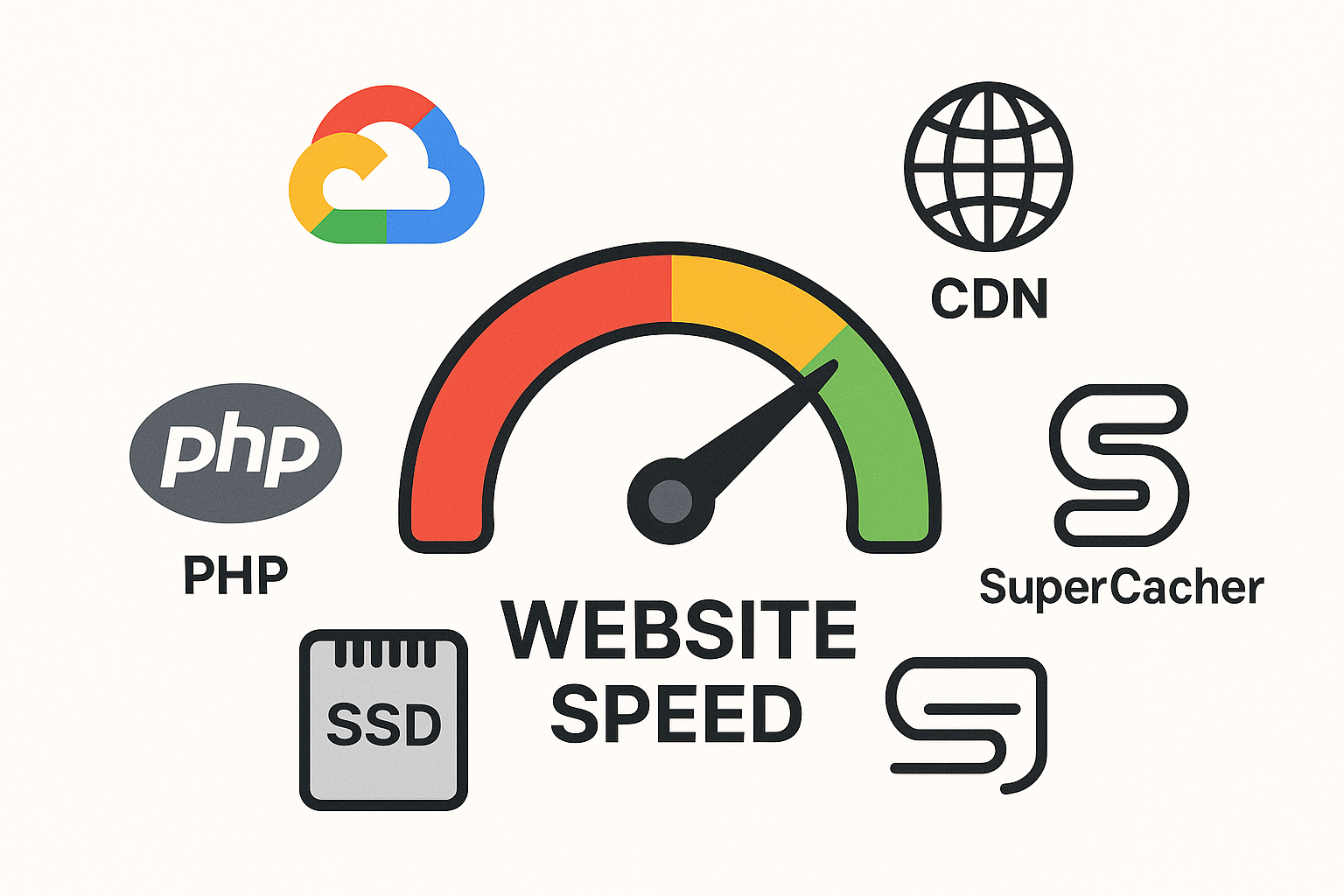
SiteGround runs its shared hosting on Google Cloud infrastructure and layers its own tuning on top. The pieces, in the order a request hits them: a free CDN in front, multi-level server caching behind it, and a PHP setup that SiteGround states runs about 30% faster on GrowBig and GoGeek. On the WordPress side, their free Speed Optimizer plugin connects your site to that caching from inside wp-admin, so you get server-level caching without configuring anything yourself.
That last part is the practical difference from generic shared hosting. On a typical cPanel host, caching is something you assemble from plugins and trial and error. On SiteGround it is on by default and managed at the server, which is why fresh WordPress installs on SiteGround tend to score well on speed tests before any optimization work.
We are deliberately not quoting lab-style response times here, because a shared server’s numbers vary by neighborhood, plan, region and time of day, and a single measurement dressed up as a benchmark would be noise. What you can do instead is measure your own site: run it through Google’s PageSpeed Insights before and after a migration and compare. The infrastructure claims above are SiteGround’s own, published ones; the caching behavior is observable on any site they host.

Data centers: 11 locations, and why the choice matters
SiteGround lets you pick the datacenter at signup, from 11 locations across four continents: Ashburn, Council Bluffs, Dallas and Los Angeles in the US; London, Madrid, Eemshaven, Frankfurt and Paris in Europe; Sydney; and Singapore. A CDN edge network sits on top of these for cached content.
The choice matters more than most buyers think. Every uncached request travels from your visitor to that datacenter and back before anything else happens, so a UK audience on a Sydney server pays a distance tax on every page. The rule is boring and correct: pick the location closest to the audience, not closest to you. A German site with German readers belongs in Frankfurt even if you run it from somewhere else. If your audience is genuinely global, the CDN covers the cached majority of requests and the datacenter choice matters mainly for logged-in and dynamic traffic.

The WordPress side: what “managed” means here
SiteGround’s shared plans are effectively managed WordPress hosting sold at shared-hosting prices, and the management layer is concrete rather than a marketing word:
- Managed automatic updates. WordPress core and plugin updates run automatically, with the schedule and scope configurable. Combined with daily backups, an update that breaks something is a restore, not a crisis.
- Free migration. Their WordPress Migrator plugin moves a site in without you touching databases, and free site migration is included, so switching hosts is not the weekend project people fear.
- One-click staging (GrowBig and up). Clone the live site, test the risky change, push to live when it works. Once you have staging, editing a live site directly starts feeling reckless, which is the point.
- Developer access on every plan. WP-CLI and SSH are included even on StartUp, with PHP version control per site. Git integration is GoGeek’s addition.
- Security Optimizer plugin. The free companion plugin handles hardening jobs (login protection, activity log, 2FA) from inside WordPress.
Staging is worth dwelling on because it changes how you actually work, not just what is technically possible. A clone of the live site lives at its own temporary URL, so a risky plugin update, a theme change, or a PHP version bump gets tested somewhere that cannot break the site your visitors see. Push to live only happens once you have confirmed it, and pushing is a one-click action from Site Tools rather than a manual file-and-database copy.

New for 2026: the AI agent and AI tokens
The newest addition is an AI layer: a free AI Agent for WordPress management, monthly AI tokens included with hosting, and access to multiple models (ChatGPT, Claude and Gemini) through their AI Studio Essential. SiteGround is positioning it as an assistant that manages and edits the site conversationally.
Our honest read: treat it as a bonus, not a buying reason. Host-bundled AI features are new enough that how useful they are in daily work is still an open question, and none of SiteGround’s fundamentals (speed, backups, support) depend on it. If it turns out excellent, you got it free; if it turns out forgettable, you lost nothing. What it does signal is that SiteGround still ships new things to the shared plans rather than treating them as a legacy product.
Site Tools: the part you touch every week
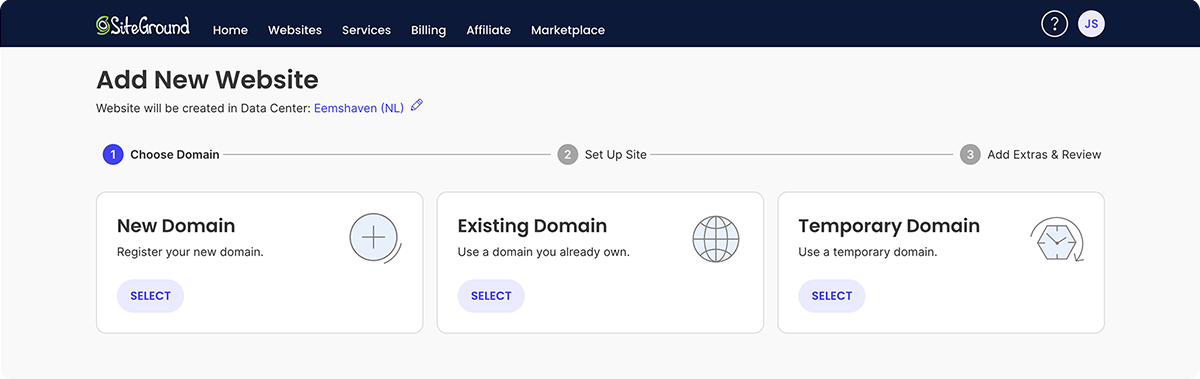
SiteGround replaced cPanel with its own Site Tools panel years ago, and it is one of the better decisions they made. Everyday jobs, installing WordPress, adding an email address, restoring a backup, creating a staging copy, sit one or two clicks from the dashboard instead of buried in a grid of forty icons. The left sidebar groups things the way a site owner thinks (Site, Security, Speed, WordPress, Domain, Email) rather than the way a server administrator does.
If you have ever handed a cPanel login to a non-technical client and then answered their questions for a week, the difference is the point. There is a learning curve only in the sense that things are not where cPanel veterans reach for them; for someone starting fresh, it is simply the easier panel.
The same organization carries over to the things you touch less often but need to find fast: a domain’s DNS records, a PHP version switch before installing a plugin that needs a newer one, or the SSH/SFTP credentials for a developer you just hired. Those sit under clearly named sections rather than a single undifferentiated icon grid, which matters most exactly when you are stressed and searching for one setting under time pressure.

Security and backups: the features you care about once
The security stack is broader than the price tier suggests: an automatically updating web application firewall, AI-driven bot protection at the platform level, free wildcard SSL via Let’s Encrypt on every domain, two-factor authentication for your account, and 24/7 monitoring on their side.
Hosting security does not exist in a vacuum, though. The server-side protections SiteGround provides only cover half the surface. The other half, weak passwords, outdated plugins, exposed login pages, sits on the WordPress side and is yours to manage. If you want a practical checklist of what to lock down inside WordPress itself, our guide on how to secure a WordPress website from hackers in 2026 covers the steps that pair with what a managed host already handles for you.
Backups deserve their own paragraph because they are the feature whose value you discover exactly once. Every plan gets automatic daily backups, kept as restore points and stored geo-distributed, meaning a copy lives somewhere other than the server it protects. GrowBig and up add on-demand backups you trigger yourself before risky changes. Restores are self-service from Site Tools, no ticket required. Combined with staging, the safety net here is better than what most hosts include at several times the price.
Self-service restores matter more than the feature list makes them sound. On hosts where a restore means opening a support ticket and waiting, a bad update can mean hours of a broken site while you wait for someone else to act. Here, picking a restore point and confirming it is something you do yourself in under a minute, which is the difference between a backup that is theoretically available and one that is actually useful during an actual incident.

Uptime, and what 99.9% actually means
SiteGround states a 99.9% uptime commitment. That sounds like a rounding error from perfect, but 0.1% of a year is roughly eight and three quarter hours of downtime. Whether that is trivial or terrifying depends entirely on what an hour of downtime costs your site, which is a number you can calculate instead of guess:
For most blogs and small business sites, 99.9% is genuinely fine, and SiteGround’s monitoring plus Google Cloud’s infrastructure make chronic instability unlikely. If the calculator above gives you an uncomfortable number, that is an argument for a different class of hosting altogether (cloud or dedicated with a stricter SLA), not for a different shared host.
Which plan actually fits your site
The honest answer depends on two numbers most people guess at: how much traffic you expect, and how heavy your pages are. You can stop guessing, this calculator works out your real monthly bandwidth and the hosting tier it implies:
Shared hosting is enough. At this traffic level, a good shared host will handle it comfortably with room to grow.
Reading the result against SiteGround’s lineup: a personal site, portfolio or young blog fits StartUp comfortably. The moment you run a second site, or want staging so changes get tested before they go live, GrowBig is the plan that makes sense, and it is where SiteGround’s value is best. GoGeek earns its price for developers managing client sites (white-label access), stores that want the priority queue, or anyone brushing against 50 GB.
If you are planning a WooCommerce store specifically, GrowBig or GoGeek is the practical starting point: staging lets you test payment flows and theme changes without risking the live checkout, and SiteGround’s managed updates keep WooCommerce core patched without manual effort. Our step-by-step WordPress WooCommerce tutorial walks through the full setup from installation to your first sale, and most of those steps assume a host that handles SSL, caching and backups for you, exactly the baseline SiteGround includes.
Watch the storage column more than the traffic estimates. 10 GB disappears fast on a photography portfolio or a site with years of media uploads, and storage, not visitor count, is what actually pushes most sites up a tier. Our storage calculator gives you a feel for how quickly image libraries grow.
Signup and setup, step by step
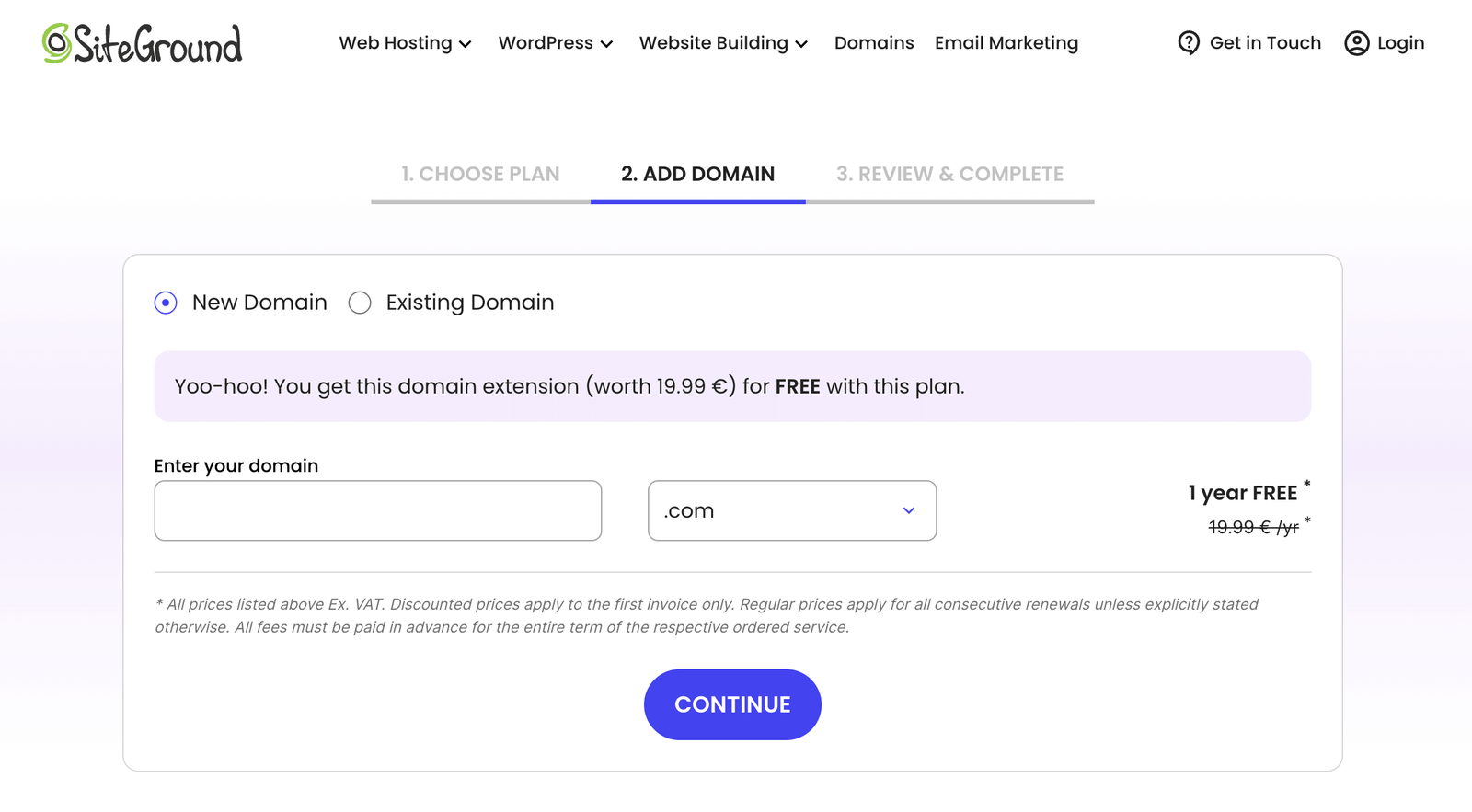
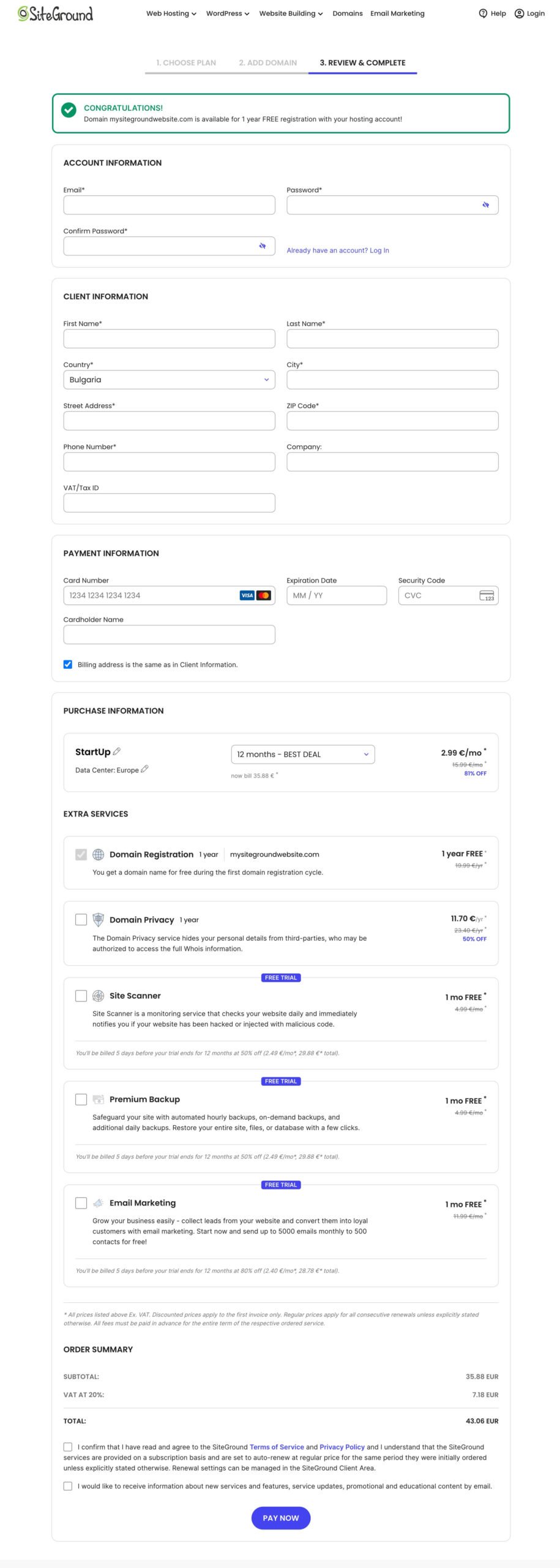
Most reviews describe checkout in the abstract. Below is what it actually looks like, screen by screen, straight from SiteGround: what you fill in to buy the plan, and what greets you the first time you log in afterward.
Checking out
Three steps, all on one flow: pick a plan, pick a domain, pay.



Your first login: the setup wizard
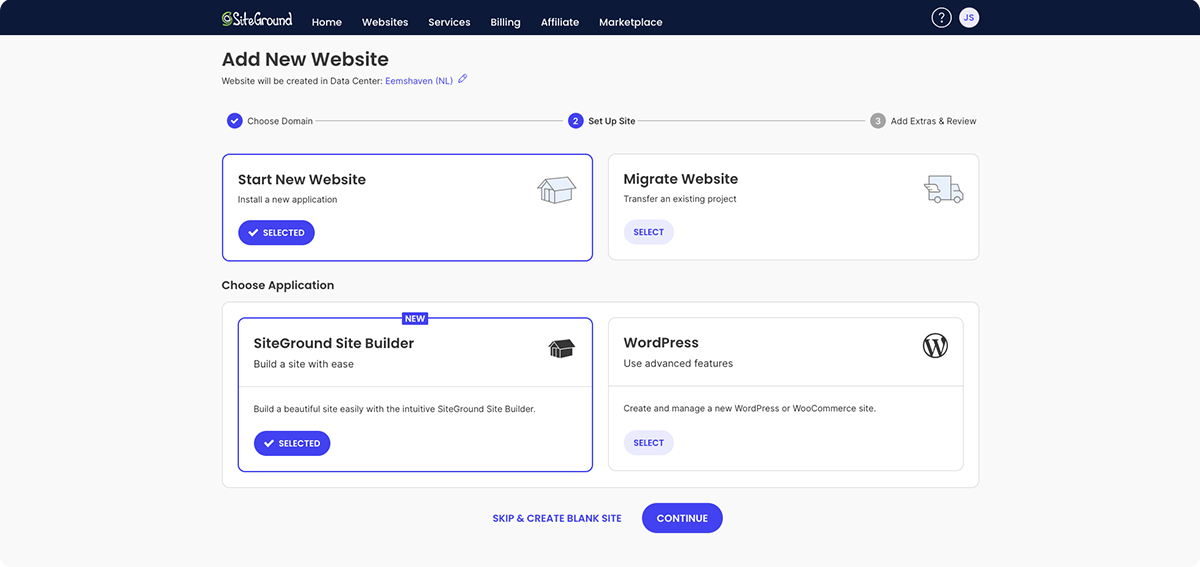
Pay, and the next thing you see is a three-step wizard that gets an actual site live, not just a dashboard with nothing on it.



Migrating an existing site in
Moving in is free in both directions that matter: the WordPress Migrator plugin automates the transfer (install it on the old host, get a token from Site Tools, wait), and free site migration is included if you would rather have it done for you. Plan the move in this order and it is a non-event:
- Migrate the site while the old hosting still runs, and preview it on SiteGround before touching DNS.
- Point the domain at SiteGround only after the preview looks right. Keep the old hosting alive for a few days as a fallback.
- If any URLs change in the move (switching from www to bare domain, or http to https), set the redirects properly rather than losing the old links’ value. Our free redirect generator writes the exact rules.
- Recheck your email: if your email was hosted at the old provider, decide whether it moves to SiteGround’s included email or stays put, before DNS changes, not after.
Support
Support is a large part of SiteGround’s reputation and a real part of what the renewal price pays for. Chat and tickets are available around the clock on every plan, the help flow starts with suggested articles but gets you to a human without a fight, and GoGeek’s priority queue shortens the wait further. I have contacted the expert support team dozens of times over the years and come away satisfied every time, usually with the issue resolved inside a single chat session rather than a back-and-forth ticket thread.

SiteGround vs Hostinger, in one honest paragraph
These two get cross-shopped constantly, and the comparison is simpler than the review sites make it. Hostinger gives you more resources per euro at every price point and its renewal increase is gentler; SiteGround gives you the stronger managed layer, the better panel, geo-distributed backups on every plan, and the support reputation. Choose Hostinger when price is the deciding factor and you are comfortable doing slightly more yourself. Choose SiteGround when you want the host to catch problems before you do and are willing to pay renewal rates for it. The full breakdown is in our Hostinger review.
Who should not use SiteGround
An honest review names its wrong audience. Skip SiteGround if:
- Lowest cost is the goal. At renewal, StartUp costs more per month than some hosts charge for far more resources. If the budget is fixed and small, SiteGround loses that comparison on paper every time.
- You store a lot of media. The 10/50/100 GB caps are the lineup’s tightest limits. A video-heavy or archive-heavy site outgrows them quickly, and object storage plus a cheap host may fit better.
- You want cheap month-to-month billing. The promotional pricing rewards paying a term upfront. If you need to pay monthly at a low rate indefinitely, this pricing model works against you.
- You need more than shared hosting can be. High-traffic stores and applications belong on cloud or dedicated infrastructure with stricter guarantees; no shared plan, SiteGround’s included, changes that.
Verdict
SiteGround in 2026 is a strong managed WordPress host sold with a pricing structure you need to walk into with open eyes. The product itself, Google Cloud infrastructure, 11 datacenter choices, Site Tools, geo-distributed daily backups, staging, free migration and competent support, justifies a premium over bargain shared hosting, and the new AI layer suggests the platform is still moving. The promo-to-renewal jump does not make it a bad deal, but it does make the first-year price a marketing number rather than the real one. Buy the longest promotional term the checkout offers, set a calendar reminder for renewal month, and you get the good version of this host.
Check current SiteGround pricing
SiteGround review FAQ
Is SiteGround worth it in 2026?
At the renewal price, yes, if you value managed WordPress features, geo-distributed backups and support over raw cheapness. If price is the deciding factor, a budget host like Hostinger delivers more resources per euro; our Hostinger review makes that comparison directly.
Why is my SiteGround renewal so much more expensive?
The promotional price applies only to your first billing term. After that, plans renew at the standard rate, which is four to five times higher. This is published pricing, not a hidden fee, but it surprises anyone who did not check the renewal column before buying. Paying for the longest promotional term at signup is the main way to delay it.
Which SiteGround plan should I choose?
StartUp for a single small site, GrowBig for multiple sites or anyone who wants staging and on-demand backups, GoGeek for developers with clients or sites needing priority support. Use the bandwidth calculator above to check whether your traffic and page weight fit the tier, and watch the storage caps if your site is media-heavy.
Which data center should I pick?
The one closest to your audience, not to you. SiteGround offers 11 locations across the US, Europe (London, Madrid, Eemshaven, Frankfurt, Paris), Sydney and Singapore, and the CDN covers cached traffic globally either way. You choose the location at signup.
Does SiteGround migrate my site for free?
Yes. The WordPress Migrator plugin automates the move yourself, and free site migration is included if you want it handled for you. Migrate and preview before changing DNS and the switch involves no downtime.
What is the SiteGround AI agent?
A free AI assistant added to the platform in 2026, with monthly AI tokens and access to models including ChatGPT, Claude and Gemini for site management tasks. It is new; treat it as a included extra rather than a reason to choose the host.
Does SiteGround have a money-back guarantee?
Yes, 30 days on shared hosting plans. That window is enough to migrate a site in, test it properly and back out if it is not for you.
Advertisement


All prices and features in this review were checked directly on siteground.com in July 2026. Pricing varies by region and promotional rates change; always confirm on the order page. See how we review and our affiliate disclosure. More free hosting tools are in our Hosting tools collection.